This is a quick post to put all publicly available Oracle BPM resources all together to avoid wasting time doing pointless searches.
Technical Forums:
Oracle Business Process Management Suite
Forum in Simplified Chinese:
http://cn.forums.oracle.com/forums/forum.jspa?forumID=315
Downloads:
http://www.oracle.com/technology/software/products/bpm/index.html
or go to http://edelivery.oracle.com/
Documentations:
Oracle BPM Configuration Matrix
10gR3
http://download.oracle.com/docs/cd/E13154_01/bpm/docs65/index.html
Docs for previous version are no longer available on edocs.bea.com for some reason. Well, we can still access them via the links below. But I have no idea how long they are going to last.
6.0
http://edocs.bea.com/albsi/docs60/index.html
5.7
http://edocs.bea.com/albsi/docs57/index.html
5.5
http://edocs.bea.com/albsi/docs55/index.html
Patches:
Where to download Oracle BPM patches now?
Wednesday, March 25, 2009

Tuesday, March 17, 2009
Linux omitted by banks
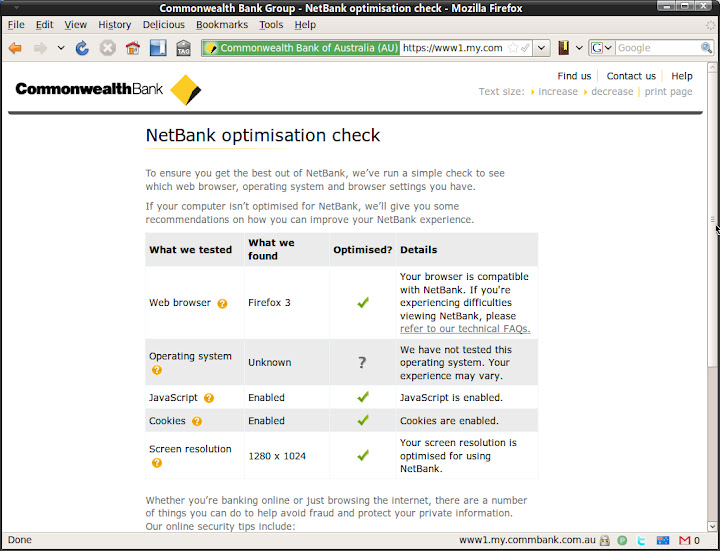
Yesterday I played around the newly enhanced Netbank of Commonwealth Bank (CBA). Generally speaking, the new UI is good. Although it is not working very well when zoomed in. Also, the new web edition for iPhone is fully functioning now. It's good to see banks are doing someting in this economic downturn.
Something weird I found when clicking on Run Optimization Check link.
I found this matrix from the link: FAQ
The system requirements to use NetBank are:
I understand that GNU/Linux is not a mainstream OS for ordinary users, market share is close to 1%. As a *NIX fan, I still feel uncomfortable to see Linux being ignored. The fact is that Mozilla Firefox itself is cross platform. As a result, all OS Firefox supports should be supported, right?
In fact, I use Linux + Firefox or Opera (swith to Chrome for Linux later this year) to access Netbank and other web based internet banking services most of the time, 90%+. It is actually a supported platform. The Netbank team should be able to do the compatibility test, resource should not a problem. If not, I would be more than happy to be a tester as if CBA offers me a VIP account or something like that:)
BTW: Of course I am still with some stupid banks who are still with IE + ActiveX combination and Windows only client. It sucks. My workaround is to run a guest Windows instance.
CBA is not the the only bank that omits GNU/Linux. Here I am not criticising CBA. I wish in the future the banks can take Linux into their account when doing compatibility test.
We all know that Linux is quite something, it is going to make a big noise in the OS market soon. Please do not omit it.
Something weird I found when clicking on Run Optimization Check link.
I found this matrix from the link: FAQ
The system requirements to use NetBank are:
Browser
| Operating System
| |||
|
| Windows 2000 | Windows XP | MAC OSX | Vista |
| Internet Explorer 6 SP2 | | |
|
|
| Internet Explorer 7 | |
| | |
| Mozilla Firefox 2 | | | | |
| Mozilla Firefox 3 | | | | |
| Safari 2 |
| | | |
| Safari 3 | | | | |

I understand that GNU/Linux is not a mainstream OS for ordinary users, market share is close to 1%. As a *NIX fan, I still feel uncomfortable to see Linux being ignored. The fact is that Mozilla Firefox itself is cross platform. As a result, all OS Firefox supports should be supported, right?
In fact, I use Linux + Firefox or Opera (swith to Chrome for Linux later this year) to access Netbank and other web based internet banking services most of the time, 90%+. It is actually a supported platform. The Netbank team should be able to do the compatibility test, resource should not a problem. If not, I would be more than happy to be a tester as if CBA offers me a VIP account or something like that:)
BTW: Of course I am still with some stupid banks who are still with IE + ActiveX combination and Windows only client. It sucks. My workaround is to run a guest Windows instance.
CBA is not the the only bank that omits GNU/Linux. Here I am not criticising CBA. I wish in the future the banks can take Linux into their account when doing compatibility test.
We all know that Linux is quite something, it is going to make a big noise in the OS market soon. Please do not omit it.
Monday, March 16, 2009
Ubuntu at Sydney Airport
It has been a while since my last post here. 2009 is a busy year for me, it is a shame on me to find more than 20 drafts to be posted:).
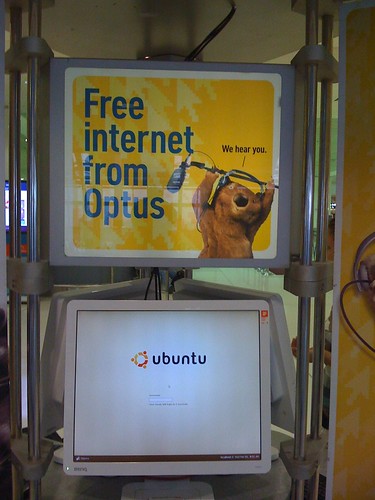
I travelled to Shanghai again on March 4, from Sydney. I found the same Free Internet Access machines sponsored by Oputs at Kingsford Smith airport. In fact I discovered this interesting thing last October when I went back to Shanghai to see my family. However, at that time I was in a hurry and I didn't have time play with it.
Operating System: Ubuntu Drapper Drake 6.06 LTS.
Desktop Environment: Gnome
Web Browser: Opera 9

How do I know that?
They did some tricks to limit user controls within a full-screened Opera Web Browser, key combination to switch to other pseudo consoles disabled. For some reason, they forgot to disable the key combination to restart X11 (U know what I am talking about, right?). I can't believe it! Hope they won't see this post:).
BTW:
Dapper Drake was my first Ubuntu version. At that time I was using Fedora Core 5. I have been using Fedora Core (now renamed to Fedora) for the past few years since it's initial release. Later on I decided to move to Debian/Ubuntu because of the APT package management. RPM really sucks.
I am more than happy to see GNU/Linux and open source apps to be used for non-profit or public services. It makes sense to make non-IT people aware that there are choices other than Microsoft Windows, and it's free of charge!
Bon voyage, Ubuntu! Well done, Debian GNU/Linux and the open source community.
I travelled to Shanghai again on March 4, from Sydney. I found the same Free Internet Access machines sponsored by Oputs at Kingsford Smith airport. In fact I discovered this interesting thing last October when I went back to Shanghai to see my family. However, at that time I was in a hurry and I didn't have time play with it.
Operating System: Ubuntu Drapper Drake 6.06 LTS.
Desktop Environment: Gnome
Web Browser: Opera 9
How do I know that?
They did some tricks to limit user controls within a full-screened Opera Web Browser, key combination to switch to other pseudo consoles disabled. For some reason, they forgot to disable the key combination to restart X11 (U know what I am talking about, right?). I can't believe it! Hope they won't see this post:).
BTW:
Dapper Drake was my first Ubuntu version. At that time I was using Fedora Core 5. I have been using Fedora Core (now renamed to Fedora) for the past few years since it's initial release. Later on I decided to move to Debian/Ubuntu because of the APT package management. RPM really sucks.
I am more than happy to see GNU/Linux and open source apps to be used for non-profit or public services. It makes sense to make non-IT people aware that there are choices other than Microsoft Windows, and it's free of charge!
Bon voyage, Ubuntu! Well done, Debian GNU/Linux and the open source community.
Thursday, February 26, 2009
Where to download Oracle BPM patches now?
The legacy BEA site will be ditched soon. We can see that http://albpmsupport.bea.com is no longer updated. Latest Oracle BPM patches are not listed there any more.
All Oracle customers are redirected to Metalink for all product support and patches.
After logging in Metalink, do a quick search with keywords 'albpm hotfix' and there will be a KB article with instructions on how to download Oracle BPM patches from 5.5 to 10gR3 or above.
Subject: How to download Oracle BPM (OBPM) patch (HotFix ) or patchset / maintenance or service Pack (MP / SP) using Oracle Metalink.
Steps:
All Oracle customers are redirected to Metalink for all product support and patches.
After logging in Metalink, do a quick search with keywords 'albpm hotfix' and there will be a KB article with instructions on how to download Oracle BPM patches from 5.5 to 10gR3 or above.
Subject: How to download Oracle BPM (OBPM) patch (HotFix ) or patchset / maintenance or service Pack (MP / SP) using Oracle Metalink.
Steps:
- Once logged in the Metalink, click on “Patches and Updates”
- Click on “Advanced Search”
- Product or Product Family: Click on the flashlight, on the search window enter “BPM” and click “Go”. The search result should show “Oracle Business Process Management Suite (beaalbpm)” product. Check the “Select” box (or click on “Check all”) and click on “Select” button.
- Now you should see Oracle Business Process Management Suite (beaalbpm) in the Product or Product Family search field.
- Select the Release: click on the flashlight near the “Release” search field and choose the appropriate version.
- Ignore the rest of the search criteria and click “Go”
- You should get all the list of available Oracle BPM patches and patchsets.
- Please verify the build number, the product (Studio, Enterprise SA and EnterpriseJEE) and the type (Patch / Hotfix or Patchset / MP ).
Thursday, January 29, 2009
Oracle BPM 10gR3 MP1 and hotfix
It was release on Jan/6/2009. As published on legacy BEA website, some of you guys may not be aware of the existence of the Maintenance Pack.
Again, please check http://albpmsupport.bea.com on a regular basis if you work on OBPM. One thing I don't understand is that why don't use a better publishing platform for the patch-set/hotfix site? Even a RSS feed would be much nicer in such a Web 2.0 era, it's easy!
10gR3 MP1 which is 10.3.1.0.0.
http://www.oracle.com/technology/software/products/bpm/index.html
It's good to find a direct link without using edelivery to download the media.
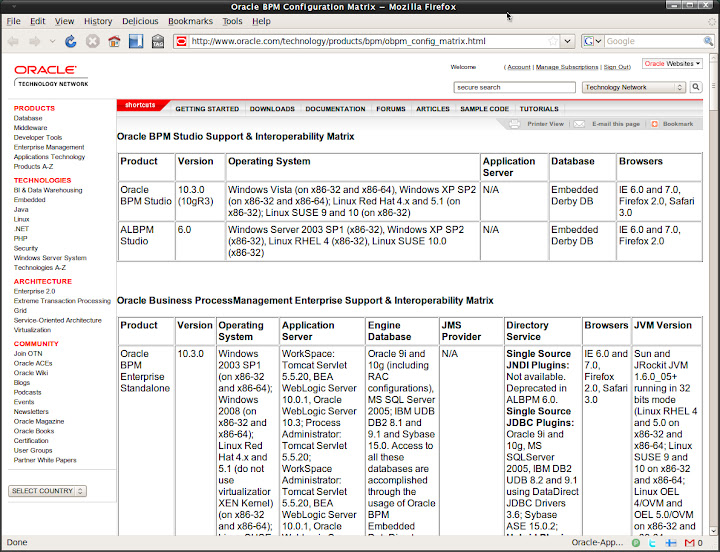
I am surprised to see the final birth of a official Mac OS X version of Studio for 10gR3 MP1 for Mac OS X. I am not a big Mac fan, but I am still glad to see OS X is supported by Oracle, maybe later OS X server, you reckon?
It seems that the newly supported platform hasn't been added to all of the release notes yet. Even the recommended official config matrix page, it has been weeks after the release...
check:
Enjoy! A late happy new year to all of you who is lucky enough to see this post!^_^
Again, please check http://albpmsupport.bea.com on a regular basis if you work on OBPM. One thing I don't understand is that why don't use a better publishing platform for the patch-set/hotfix site? Even a RSS feed would be much nicer in such a Web 2.0 era, it's easy!
10gR3 MP1 which is 10.3.1.0.0.
http://www.oracle.com/technology/software/products/bpm/index.html
It's good to find a direct link without using edelivery to download the media.
I am surprised to see the final birth of a official Mac OS X version of Studio for 10gR3 MP1 for Mac OS X. I am not a big Mac fan, but I am still glad to see OS X is supported by Oracle, maybe later OS X server, you reckon?
It seems that the newly supported platform hasn't been added to all of the release notes yet. Even the recommended official config matrix page, it has been weeks after the release...
check:
Enjoy! A late happy new year to all of you who is lucky enough to see this post!^_^
Thursday, January 15, 2009
Finally Canonical/Ubuntu fixed the high LCC
Early this morning, I found that there was a new fix for ACPI. After checking the details, I confirmed that a obviously and easy-to-fix bug has finally been fixed after being reported for 2+ years. It was first reported back in September, 2006...
Anyway, it is fixed!
More info:
https://bugs.launchpad.net/ubuntu/+source/acpi-support/+bug/59695
I dug a bit further. The fix is actually a few script hooking up with different mode of ACPI, pretty much doing the same thing as the ugly fix does.
So if you applied the ugly fix, you can delete the ugly fix from ACPI folders:
$sudo rm /etc/acpi/resume.d/99-hdd-ugly-fix.sh
$sudo rm /etc/acpi/start.d/99-hdd-ugly-fix.sh
$sudo rm /etc/acpi/ac.d/99-hdd-ugly-fix.sh
$sudo rm /etc/acpi/battery.d/99-hdd-ugly-fix.sh
In fact we can take a look at the 90-hdparm.sh script, it is more elegant than the ugly fix:) Maybe that's why the author of the ugly fix named it.
Anyway, it is fixed!
More info:
https://bugs.launchpad.net/ubuntu/+source/acpi-support/+bug/59695
I dug a bit further. The fix is actually a few script hooking up with different mode of ACPI, pretty much doing the same thing as the ugly fix does.
So if you applied the ugly fix, you can delete the ugly fix from ACPI folders:
$sudo rm /etc/acpi/resume.d/99-hdd-ugly-fix.sh
$sudo rm /etc/acpi/start.d/99-hdd-ugly-fix.sh
$sudo rm /etc/acpi/ac.d/99-hdd-ugly-fix.sh
$sudo rm /etc/acpi/battery.d/99-hdd-ugly-fix.sh
In fact we can take a look at the 90-hdparm.sh script, it is more elegant than the ugly fix:) Maybe that's why the author of the ugly fix named it.
Wednesday, January 14, 2009
Can't apply patches for Oracle BPM (ALBPM) Studio on Windows?
The first hot fix and service pack for Oracle BPM 10gR3 were released. If you do a quick search on Google, you'll surprisingly found that it is still published on BEA web site for some reason.
I did noticed that folks run into problems applying the hot fix. I am not sure if there is any customer out there who is using this release. However, as it is first release under Oracle, it shoud have drew enough attention of the public. Besides, bloody Windows still owns almost 80% of the OS market. So I reckon that this post won't be a waste of time anyway.
Finally we got something officially, this is a known issue for Studio(Windows only).
Symptom: Errors will be encountered when applying hot fix for OBPM studio 10gR3 GA.
"Files in use by another application. Stop all BPM applications before installing this update.
Detail:The following file could not be modified: C:\Oracle\BPMStudio\lib\fuego.boot.jar."
Solution:
1. shutdown Studio
2. download the fuego.boot.jar(MP0 hotfix) or fuego.boot.jar(MP1) file listed in the download website for your particular update.
3. copy the downloaded fuego.boot.jar file to studio_installation_dir/lib
4.start Studio
5. apply either the HF
Note: There are 2 different fuego.boot.jar files. This needs to be done only once for 10gR3 GA. After you have applied the hotfix or or pactchset(MP), you don't need to do it again.
Check Help - About for version info: 10.3.0.0.0 Build #94551 or 10.3.1.0 Build #94375
For more info, check this out:
http://albpmsupport.bea.com/download/10gR3/10gR3Studio.jsp
More updates:
If you try to upgrade from ALBPM 6.0 MP4 to MP5, you'll probably run into the same issue.
"This HotFix cannot be applied to this product version. Detail: Current Version: 4 - HotFix Service Pack Version: 5".
The workaround is to shutdown Studio, copy the fuego.boot.jar file from STUDIO_INSTALL_DIR/studio/studio/eclipse/plugins/fuego.boot_6.0.0 to STUDIO_INSTALL_DIR/lib, overwrite the one there. Start Studio and apply the hot fix again.
replace the one in /lib
I did noticed that folks run into problems applying the hot fix. I am not sure if there is any customer out there who is using this release. However, as it is first release under Oracle, it shoud have drew enough attention of the public. Besides, bloody Windows still owns almost 80% of the OS market. So I reckon that this post won't be a waste of time anyway.
Finally we got something officially, this is a known issue for Studio(Windows only).
Symptom: Errors will be encountered when applying hot fix for OBPM studio 10gR3 GA.
"Files in use by another application. Stop all BPM applications before installing this update.
Detail:The following file could not be modified: C:\Oracle\BPMStudio\lib\fuego.boot.jar."
Solution:
1. shutdown Studio
2. download the fuego.boot.jar(MP0 hotfix) or fuego.boot.jar(MP1) file listed in the download website for your particular update.
3. copy the downloaded fuego.boot.jar file to studio_installation_dir/lib
4.start Studio
5. apply either the HF
Note: There are 2 different fuego.boot.jar files. This needs to be done only once for 10gR3 GA. After you have applied the hotfix or or pactchset(MP), you don't need to do it again.
Check Help - About for version info: 10.3.0.0.0 Build #94551 or 10.3.1.0 Build #94375
For more info, check this out:
http://albpmsupport.bea.com/download/10gR3/10gR3Studio.jsp
More updates:
If you try to upgrade from ALBPM 6.0 MP4 to MP5, you'll probably run into the same issue.
"This HotFix cannot be applied to this product version. Detail: Current Version: 4 - HotFix Service Pack Version: 5".
The workaround is to shutdown Studio, copy the fuego.boot.jar file from STUDIO_INSTALL_DIR/studio/studio/eclipse/plugins/fuego.boot_6.0.0 to STUDIO_INSTALL_DIR/lib, overwrite the one there. Start Studio and apply the hot fix again.
replace the one in /lib
Subscribe to:
Posts (Atom)
FriendFeed badge

RSS


 Posts
All Comments
Posts
All Comments