This is a quick post to put all publicly available Oracle BPM resources all together to avoid wasting time doing pointless searches.
Technical Forums:
Oracle Business Process Management Suite
Forum in Simplified Chinese:
http://cn.forums.oracle.com/forums/forum.jspa?forumID=315
Downloads:
http://www.oracle.com/technology/software/products/bpm/index.html
or go to http://edelivery.oracle.com/
Documentations:
Oracle BPM Configuration Matrix
10gR3
http://download.oracle.com/docs/cd/E13154_01/bpm/docs65/index.html
Docs for previous version are no longer available on edocs.bea.com for some reason. Well, we can still access them via the links below. But I have no idea how long they are going to last.
6.0
http://edocs.bea.com/albsi/docs60/index.html
5.7
http://edocs.bea.com/albsi/docs57/index.html
5.5
http://edocs.bea.com/albsi/docs55/index.html
Patches:
Where to download Oracle BPM patches now?
Showing posts with label bpm. Show all posts
Showing posts with label bpm. Show all posts
Wednesday, March 25, 2009

Thursday, February 26, 2009
Where to download Oracle BPM patches now?
The legacy BEA site will be ditched soon. We can see that http://albpmsupport.bea.com is no longer updated. Latest Oracle BPM patches are not listed there any more.
All Oracle customers are redirected to Metalink for all product support and patches.
After logging in Metalink, do a quick search with keywords 'albpm hotfix' and there will be a KB article with instructions on how to download Oracle BPM patches from 5.5 to 10gR3 or above.
Subject: How to download Oracle BPM (OBPM) patch (HotFix ) or patchset / maintenance or service Pack (MP / SP) using Oracle Metalink.
Steps:
All Oracle customers are redirected to Metalink for all product support and patches.
After logging in Metalink, do a quick search with keywords 'albpm hotfix' and there will be a KB article with instructions on how to download Oracle BPM patches from 5.5 to 10gR3 or above.
Subject: How to download Oracle BPM (OBPM) patch (HotFix ) or patchset / maintenance or service Pack (MP / SP) using Oracle Metalink.
Steps:
- Once logged in the Metalink, click on “Patches and Updates”
- Click on “Advanced Search”
- Product or Product Family: Click on the flashlight, on the search window enter “BPM” and click “Go”. The search result should show “Oracle Business Process Management Suite (beaalbpm)” product. Check the “Select” box (or click on “Check all”) and click on “Select” button.
- Now you should see Oracle Business Process Management Suite (beaalbpm) in the Product or Product Family search field.
- Select the Release: click on the flashlight near the “Release” search field and choose the appropriate version.
- Ignore the rest of the search criteria and click “Go”
- You should get all the list of available Oracle BPM patches and patchsets.
- Please verify the build number, the product (Studio, Enterprise SA and EnterpriseJEE) and the type (Patch / Hotfix or Patchset / MP ).
Thursday, January 29, 2009
Oracle BPM 10gR3 MP1 and hotfix
It was release on Jan/6/2009. As published on legacy BEA website, some of you guys may not be aware of the existence of the Maintenance Pack.
Again, please check http://albpmsupport.bea.com on a regular basis if you work on OBPM. One thing I don't understand is that why don't use a better publishing platform for the patch-set/hotfix site? Even a RSS feed would be much nicer in such a Web 2.0 era, it's easy!
10gR3 MP1 which is 10.3.1.0.0.
http://www.oracle.com/technology/software/products/bpm/index.html
It's good to find a direct link without using edelivery to download the media.
I am surprised to see the final birth of a official Mac OS X version of Studio for 10gR3 MP1 for Mac OS X. I am not a big Mac fan, but I am still glad to see OS X is supported by Oracle, maybe later OS X server, you reckon?
It seems that the newly supported platform hasn't been added to all of the release notes yet. Even the recommended official config matrix page, it has been weeks after the release...
check:
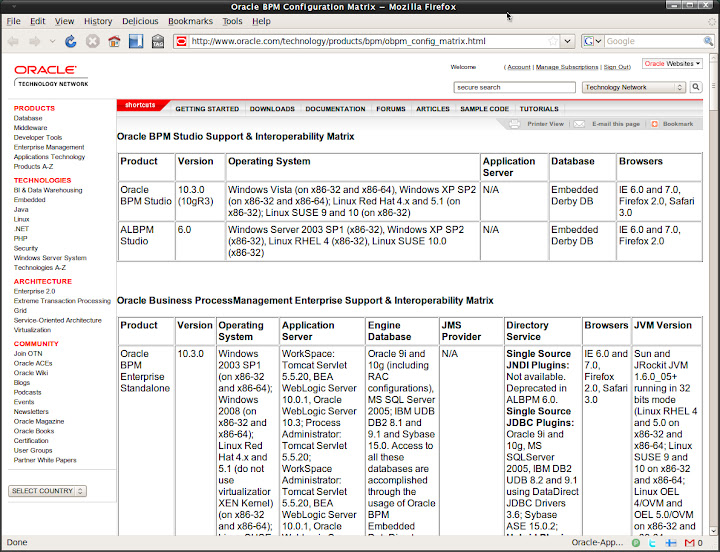
Enjoy! A late happy new year to all of you who is lucky enough to see this post!^_^
Again, please check http://albpmsupport.bea.com on a regular basis if you work on OBPM. One thing I don't understand is that why don't use a better publishing platform for the patch-set/hotfix site? Even a RSS feed would be much nicer in such a Web 2.0 era, it's easy!
10gR3 MP1 which is 10.3.1.0.0.
http://www.oracle.com/technology/software/products/bpm/index.html
It's good to find a direct link without using edelivery to download the media.
I am surprised to see the final birth of a official Mac OS X version of Studio for 10gR3 MP1 for Mac OS X. I am not a big Mac fan, but I am still glad to see OS X is supported by Oracle, maybe later OS X server, you reckon?
It seems that the newly supported platform hasn't been added to all of the release notes yet. Even the recommended official config matrix page, it has been weeks after the release...
check:
Enjoy! A late happy new year to all of you who is lucky enough to see this post!^_^
Wednesday, January 14, 2009
Can't apply patches for Oracle BPM (ALBPM) Studio on Windows?
The first hot fix and service pack for Oracle BPM 10gR3 were released. If you do a quick search on Google, you'll surprisingly found that it is still published on BEA web site for some reason.
I did noticed that folks run into problems applying the hot fix. I am not sure if there is any customer out there who is using this release. However, as it is first release under Oracle, it shoud have drew enough attention of the public. Besides, bloody Windows still owns almost 80% of the OS market. So I reckon that this post won't be a waste of time anyway.
Finally we got something officially, this is a known issue for Studio(Windows only).
Symptom: Errors will be encountered when applying hot fix for OBPM studio 10gR3 GA.
"Files in use by another application. Stop all BPM applications before installing this update.
Detail:The following file could not be modified: C:\Oracle\BPMStudio\lib\fuego.boot.jar."
Solution:
1. shutdown Studio
2. download the fuego.boot.jar(MP0 hotfix) or fuego.boot.jar(MP1) file listed in the download website for your particular update.
3. copy the downloaded fuego.boot.jar file to studio_installation_dir/lib
4.start Studio
5. apply either the HF
Note: There are 2 different fuego.boot.jar files. This needs to be done only once for 10gR3 GA. After you have applied the hotfix or or pactchset(MP), you don't need to do it again.
Check Help - About for version info: 10.3.0.0.0 Build #94551 or 10.3.1.0 Build #94375
For more info, check this out:
http://albpmsupport.bea.com/download/10gR3/10gR3Studio.jsp
More updates:
If you try to upgrade from ALBPM 6.0 MP4 to MP5, you'll probably run into the same issue.
"This HotFix cannot be applied to this product version. Detail: Current Version: 4 - HotFix Service Pack Version: 5".
The workaround is to shutdown Studio, copy the fuego.boot.jar file from STUDIO_INSTALL_DIR/studio/studio/eclipse/plugins/fuego.boot_6.0.0 to STUDIO_INSTALL_DIR/lib, overwrite the one there. Start Studio and apply the hot fix again.
replace the one in /lib
I did noticed that folks run into problems applying the hot fix. I am not sure if there is any customer out there who is using this release. However, as it is first release under Oracle, it shoud have drew enough attention of the public. Besides, bloody Windows still owns almost 80% of the OS market. So I reckon that this post won't be a waste of time anyway.
Finally we got something officially, this is a known issue for Studio(Windows only).
Symptom: Errors will be encountered when applying hot fix for OBPM studio 10gR3 GA.
"Files in use by another application. Stop all BPM applications before installing this update.
Detail:The following file could not be modified: C:\Oracle\BPMStudio\lib\fuego.boot.jar."
Solution:
1. shutdown Studio
2. download the fuego.boot.jar(MP0 hotfix) or fuego.boot.jar(MP1) file listed in the download website for your particular update.
3. copy the downloaded fuego.boot.jar file to studio_installation_dir/lib
4.start Studio
5. apply either the HF
Note: There are 2 different fuego.boot.jar files. This needs to be done only once for 10gR3 GA. After you have applied the hotfix or or pactchset(MP), you don't need to do it again.
Check Help - About for version info: 10.3.0.0.0 Build #94551 or 10.3.1.0 Build #94375
For more info, check this out:
http://albpmsupport.bea.com/download/10gR3/10gR3Studio.jsp
More updates:
If you try to upgrade from ALBPM 6.0 MP4 to MP5, you'll probably run into the same issue.
"This HotFix cannot be applied to this product version. Detail: Current Version: 4 - HotFix Service Pack Version: 5".
The workaround is to shutdown Studio, copy the fuego.boot.jar file from STUDIO_INSTALL_DIR/studio/studio/eclipse/plugins/fuego.boot_6.0.0 to STUDIO_INSTALL_DIR/lib, overwrite the one there. Start Studio and apply the hot fix again.
replace the one in /lib
Thursday, November 20, 2008
Too Many Open Files on Ubuntu Linux when installing Oracle BPM
Recently I've been working on VM images for test a test environment based on the new Oracle BPM 10gR3 release and the OS has to be Linux for some reason.
Environment
OS: Ubuntu 8.10 Intrepid Ibex 32-bit
Kernel: 2.6.27-7-generic
JDK: Sun JDK 1.6.0_10
Weblogic Server 10gR3 on JRockit 1.6.0_05 (R27.6.0-50 linux ia32)
(I use the Oracle Service Bus 10gR3 install media which includes WLS)
Oracle 10g XE
We can do it even though Ubuntu is not a supported configuration as per the support matrix. Baiscally all Linux distribution is the same, the only thing matters is the administrator;-)
Interoperability Matrix:
http://www.oracle.com/technology/products/bpm/obpm_config_matrix.html
Note: Create a user for WLS and OBPM is recommended. Using root to install is okay but DO remember to change the owner of the destination to the user created to run WLS and OBPM later. DO NOT use root to run WLS and OBPM in production environment for security.
So I checked the WLS logs as well as the Adim Center logs. It seems that errors were encountered when executing WLST. Errors in Admin Center log:
java.io.FileNotFoundException: /opt/bea/user_projects/domains/bpm/config/config.xml (Too many open files)
This is simply due to the default Linux user security limit, by default a user's max open files (per Terminal session) is 1024 on almost all Linux distributions that I am aware of. This default value is the culprit in this case. For WebLogic Server deployment, it is recommended to change the value to at lease 131072 (Oracle Enterprise Linux recommended, changes can be seen by looking into the oracle-validated RPM package).
Session Wide Solution:
sysctl -w fs.file-max 65536
sysctl -a
(echo "65536" > /proc/sys/fs/file-max)
To make this change permanent by inserting the kernel parameter in the /etc/sysctl.conf startup file:
# echo "fs.file-max=65536" >> /etc/sysctl.conf
Basically the priority is: soft limit < style="font-weight: normal;">The Linux kernel provides the getrlimit and setrlimit system calls to get and set resource limits per process. Each resource has an associated soft and hard limit. The soft limit is the value that the kernel enforces for the corresponding resource. The hard limit acts as a ceiling for the soft limit: an unprivileged process may only set its soft limit to a value in the range from 0 up to the hard limit, and (irreversibly) lower its hard limit. A privileged process (one with the CAP_SYS_RESOURCE capability) may make arbitrary changes to either limit value.
Doubt: Why the output from cat /proc/sys/fs/file-nr and lsof | wc -l always different?
Basically, file-nr provides the open File Descriptors (Data Structure, required handle when applications try to open a file) while lsof outputs Open Files including those NOT using File Descriptors (e.g. current working directory, library files mapped into memory, executable text file etc...).
Generally speaking, lsof of a process always > process's open file descriptors
Do a quick test on your system:
Get Firefox's pid
Get number of opened files by Firefox
lsof -p pid | wc -l
Or
lsof | grep pid | wc -l
Check Firefox process's File Descriptors
ls /proc/pid/fd | wc -l
Compare, got it?
Note: Loaded Library files can be checked by digging into /proc/pid/maps
For Oracle Enterprise Linux and Red Hat Enterprise Linux
Install the oracle-validated package which will resolve all Oracle Fusion Middleware and Database required dependencies and system configurations. Simple run yum install oracle-validated or download the rpm and manually install it!
Tips: Install OpenSSH for easy management as a VM. If you prefer Web UI, try webmin it is also a good tool for overall management. I install webmin on each of my Ubuntu Server VM or box.
Environment
OS: Ubuntu 8.10 Intrepid Ibex 32-bit
Kernel: 2.6.27-7-generic
JDK: Sun JDK 1.6.0_10
Weblogic Server 10gR3 on JRockit 1.6.0_05 (R27.6.0-50 linux ia32)
(I use the Oracle Service Bus 10gR3 install media which includes WLS)
Oracle 10g XE
We can do it even though Ubuntu is not a supported configuration as per the support matrix. Baiscally all Linux distribution is the same, the only thing matters is the administrator;-)
Interoperability Matrix:
http://www.oracle.com/technology/products/bpm/obpm_config_matrix.html
Note: Create a user for WLS and OBPM is recommended. Using root to install is okay but DO remember to change the owner of the destination to the user created to run WLS and OBPM later. DO NOT use root to run WLS and OBPM in production environment for security.
- Launch admin center using root, just use su -s to avoid typing sudo all the time. If not we may encounter permission problems.
/opt/OracleBPMwlHome/bin/./obpmadmcenter - Click configuration, in Directory tab, click add to create directory. I don't want to talk all the details, please refer to the official installation guide for more details:http://download.oracle.com/docs/cd/E13154_01/bpm/docs65/config_guide/index.html
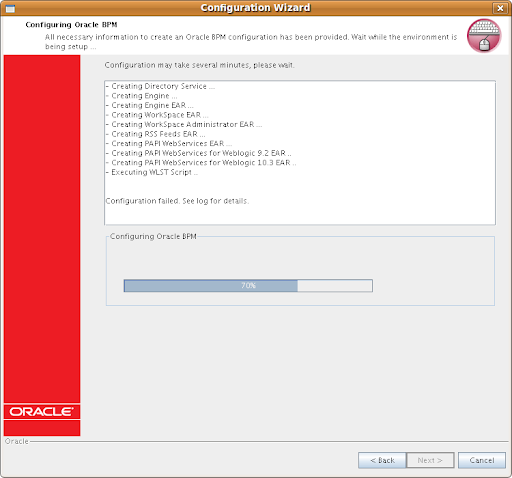
Normally this is probably a pain free process (actually it was on Windows as I did it a few days ago)
In this case, the Configuration wizard hang at around 70%, like in the screenshot.
So I checked the WLS logs as well as the Adim Center logs. It seems that errors were encountered when executing WLST. Errors in Admin Center log:
java.io.FileNotFoundException: /opt/bea/user_projects/domains/bpm/config/config.xml (Too many open files)
This is simply due to the default Linux user security limit, by default a user's max open files (per Terminal session) is 1024 on almost all Linux distributions that I am aware of. This default value is the culprit in this case. For WebLogic Server deployment, it is recommended to change the value to at lease 131072 (Oracle Enterprise Linux recommended, changes can be seen by looking into the oracle-validated RPM package).
Session Wide Solution:
Increase the limit of open files using the command ulimit -n 131072 in a Terminal session, start the obpmadmcenter and WLS in the same Terminal session.
Use ulimit -a or ulimit -n to check the new limit. This is just a temporary workaround, you lose the changes once terminal session ends.
Make the change permanent:
Change the file /etc/security/limits.conf (root access required)
Add the following lines, assume user is oracle (the following changes are recomended by Oracle, for Fusion Middleware and Database 10g/11g):
oracle hard nofile 131072
oracle soft nofile 131072
oracle hard nproc 131072
oracle soft nproc 131072
oracle soft core unlimited
oracle hard core unlimited
oracle soft memlock 3500000
oracle hard memlock 3500000
# Recommended stack hard limit 32MB for oracle installations
# oracle hard stack 32768
Start Admin Center, start BPM Web applications, then Weblogic Server. Now you can login to Process Administrator (webconsole) and Workspace and see the sample process if you selected the option.
Alternative workaround(from Official Debian Documentation and Oracle Technology Network):
Use ulimit -a or ulimit -n to check the new limit. This is just a temporary workaround, you lose the changes once terminal session ends.
Make the change permanent:
Change the file /etc/security/limits.conf (root access required)
Add the following lines, assume user is oracle (the following changes are recomended by Oracle, for Fusion Middleware and Database 10g/11g):
oracle hard nofile 131072
oracle soft nofile 131072
oracle hard nproc 131072
oracle soft nproc 131072
oracle soft core unlimited
oracle hard core unlimited
oracle soft memlock 3500000
oracle hard memlock 3500000
# Recommended stack hard limit 32MB for oracle installations
# oracle hard stack 32768
Start Admin Center, start BPM Web applications, then Weblogic Server. Now you can login to Process Administrator (webconsole) and Workspace and see the sample process if you selected the option.
Alternative workaround(from Official Debian Documentation and Oracle Technology Network):
make the change without rebooting the server box
sysctl -w fs.file-max 65536
sysctl -a
(echo "65536" > /proc/sys/fs/file-max)
# echo "fs.file-max=65536" >> /etc/sysctl.conf
To query the current usage of file handles by using the following:
# cat /proc/sys/fs/file-nr
825 0 65536
Basically the priority is: soft limit < style="font-weight: normal;">The Linux kernel provides the getrlimit and setrlimit system calls to get and set resource limits per process. Each resource has an associated soft and hard limit. The soft limit is the value that the kernel enforces for the corresponding resource. The hard limit acts as a ceiling for the soft limit: an unprivileged process may only set its soft limit to a value in the range from 0 up to the hard limit, and (irreversibly) lower its hard limit. A privileged process (one with the CAP_SYS_RESOURCE capability) may make arbitrary changes to either limit value.
Doubt: Why the output from cat /proc/sys/fs/file-nr and lsof | wc -l always different?
Basically, file-nr provides the open File Descriptors (Data Structure, required handle when applications try to open a file) while lsof outputs Open Files including those NOT using File Descriptors (e.g. current working directory, library files mapped into memory, executable text file etc...).
Generally speaking, lsof of a process always > process's open file descriptors
Do a quick test on your system:
Get Firefox's pid
Get number of opened files by Firefox
lsof -p pid | wc -l
Or
lsof | grep pid | wc -l
Check Firefox process's File Descriptors
ls /proc/pid/fd | wc -l
Compare, got it?
Note: Loaded Library files can be checked by digging into /proc/pid/maps
For Oracle Enterprise Linux and Red Hat Enterprise Linux
Install the oracle-validated package which will resolve all Oracle Fusion Middleware and Database required dependencies and system configurations. Simple run yum install oracle-validated or download the rpm and manually install it!
Tips: Install OpenSSH for easy management as a VM. If you prefer Web UI, try webmin it is also a good tool for overall management. I install webmin on each of my Ubuntu Server VM or box.
References:
Friday, November 14, 2008
Switch Oracle BPM (ALBPM) Studio Language
AquaLogic (Fuego) BPM is now part of Oracle BPM Suite and renamed to Oracle BPM.
Back in the 5.x era, the studio IDE is a Swing based app. As far as I know, from 5.7 BEA started to implement i18n for Studio. However, only several languages are available. It can be switched via menu.
From 6.0 whose code name is puma, a new Studio IDE is built on top of Eclipse IDE. In theory it is should support multiligual. However there is not apparent options in the UI to switch language.
A coworker of mine in China asked my that why his ALBPM 6.0 Studio was in Chinese Simplified. And he was not able to change it. After looking at the locale setting which was zh_CN. And he was not willing to change the system locale. So I told him to try switching using eclipse way:) It did work. I then digged further into the installation folder and found it is multilingual in fact.
Tip applicable for version:
ALBPM Studio 6.0.x
Oracle BPM Studio 10gR3 (10.3) which is ALBPM 6.5
How to use:
Windows OS
Edit the Studio shortcut and add the -nl option. It should look like this:
C:\Oracle\OracleBPMStudio\eclipse\eclipse.exe -nl de
*NIX
Assume that we install Studio in /opt folder.
/opt/OracleBPMStudio/eclipse/./eclipse -nl de
Note: In the 10gR3 Studio installatio folder, there is even no icon for the app but a Eclipse icon...
Check the installation folder and you will find the available languages:
C:\OracleBPMStudio\studio\eclipse\plugins
/opt/OracleBPMStudio/studio/eclipse/plugins
en
es
ja
ko
zh
zh_TW
de
fr
it
nl
pt
For more info on Eclipse:
http://help.eclipse.org/ganymede/index.jsp?topic=/org.eclipse.platform.doc.user/tasks/running_eclipse.htm
Back in the 5.x era, the studio IDE is a Swing based app. As far as I know, from 5.7 BEA started to implement i18n for Studio. However, only several languages are available. It can be switched via menu.
From 6.0 whose code name is puma, a new Studio IDE is built on top of Eclipse IDE. In theory it is should support multiligual. However there is not apparent options in the UI to switch language.
A coworker of mine in China asked my that why his ALBPM 6.0 Studio was in Chinese Simplified. And he was not able to change it. After looking at the locale setting which was zh_CN. And he was not willing to change the system locale. So I told him to try switching using eclipse way:) It did work. I then digged further into the installation folder and found it is multilingual in fact.
Tip applicable for version:
ALBPM Studio 6.0.x
Oracle BPM Studio 10gR3 (10.3) which is ALBPM 6.5
How to use:
Windows OS
Edit the Studio shortcut and add the -nl option. It should look like this:
C:\Oracle\OracleBPMStudio\eclipse\eclipse.exe -nl de
*NIX
Assume that we install Studio in /opt folder.
/opt/OracleBPMStudio/eclipse/./eclipse -nl de
Note: In the 10gR3 Studio installatio folder, there is even no icon for the app but a Eclipse icon...
Check the installation folder and you will find the available languages:
C:\OracleBPMStudio\studio\eclipse\plugins
/opt/OracleBPMStudio/studio/eclipse/plugins
en
es
ja
ko
zh
zh_TW
de
fr
it
nl
pt
For more info on Eclipse:
http://help.eclipse.org/ganymede/index.jsp?topic=/org.eclipse.platform.doc.user/tasks/running_eclipse.htm
Saturday, October 18, 2008
Oracle BPM 10gR3 (ALBPM 6.5) GA
Oracle BPM 10gR3 which was BEA AquaLogic BPM, Fuego BPM is GA now.
From the new versioning, we can clearly see that it is 10.3. However, in fact it is 6.5.
After the acquisition, ALBPM has been renamed to Oracle BPM and put into the Oracle Fusion Middleware stack, along with Oracle BPEL Process Manager and Oracle BPA Suite.
Differences between BPM Suite offerings
Oracle BPM
Human and System Centric BPM with SOA. Easy integration with WebCenter Interaction (AquaLogic Interaction, Plumtree Portal).
Business user friendly
Collaborative
Agile
BPMN & BPEL
SOA architecture
Apps integration, AIA
Oracle BPEL Process Manager
System Centric
SOA architecture
Apps integration, AIA
BPEL
High performance STP
Round-tripping with BPA
Oracle BPA Suite
Methodology Driven Process Modeling and Analysis.
Process Experts
Six Sigma, Lean
Methodology
Hierarchical Modeling
Documentation
Download: http://edelivery.oracle.com
or
http://www.oracle.com/technology/software/products/bpm/index.html
Fill in some necessary info and go to Oracle Fusion Middleware, choose your platform, you will finally find them in Oracle Application Server 10g Release 3 (10.1.3) Media Pack.
Studio
Enterprise Standalone
Enterprise for Weblogic Server
Enterprise For Websphere Application Server
I have no idea why the links on the page below haven't been upgraded yet. Maybe Oracle is going to decommission the BEA page.
http://www.oracle.com/technology/software/products/ias/bea_main.html
Oracle BPM 10gR3 docs
http://download.oracle.com/docs/cd/E13154_01/bpm/docs65/index.html
The docs are still not helpful enough, I hope that Oracle improves its newly acquired products. At least make them as good as Oracle Database docs.
Interoperability matrix:
http://www.oracle.com/technology/products/bpm/obpm_config_matrix.html
All BEA docs, including new versions of WebCenter Interaction suite (AquaLogic User Interaction).
http://www.oracle.com/technology/documentation/bea.html
Enjoy the new release. I believe that the next GA will be named 11g, if there is such thing.
Articles you may be interested in: Ten reasons why you should look at Oracle BPM Suite 10gR3
From the new versioning, we can clearly see that it is 10.3. However, in fact it is 6.5.
After the acquisition, ALBPM has been renamed to Oracle BPM and put into the Oracle Fusion Middleware stack, along with Oracle BPEL Process Manager and Oracle BPA Suite.
Differences between BPM Suite offerings
Oracle BPM
Human and System Centric BPM with SOA. Easy integration with WebCenter Interaction (AquaLogic Interaction, Plumtree Portal).
Business user friendly
Collaborative
Agile
BPMN & BPEL
SOA architecture
Apps integration, AIA
Oracle BPEL Process Manager
System Centric
SOA architecture
Apps integration, AIA
BPEL
High performance STP
Round-tripping with BPA
Oracle BPA Suite
Methodology Driven Process Modeling and Analysis.
Process Experts
Six Sigma, Lean
Methodology
Hierarchical Modeling
Documentation
Download: http://edelivery.oracle.com
or
http://www.oracle.com/technology/software/products/bpm/index.html
Fill in some necessary info and go to Oracle Fusion Middleware, choose your platform, you will finally find them in Oracle Application Server 10g Release 3 (10.1.3) Media Pack.
Studio
Enterprise Standalone
Enterprise for Weblogic Server
Enterprise For Websphere Application Server
I have no idea why the links on the page below haven't been upgraded yet. Maybe Oracle is going to decommission the BEA page.
http://www.oracle.com/technology/software/products/ias/bea_main.html
Oracle BPM 10gR3 docs
http://download.oracle.com/docs/cd/E13154_01/bpm/docs65/index.html
The docs are still not helpful enough, I hope that Oracle improves its newly acquired products. At least make them as good as Oracle Database docs.
Interoperability matrix:
http://www.oracle.com/technology/products/bpm/obpm_config_matrix.html
All BEA docs, including new versions of WebCenter Interaction suite (AquaLogic User Interaction).
http://www.oracle.com/technology/documentation/bea.html
Enjoy the new release. I believe that the next GA will be named 11g, if there is such thing.
Articles you may be interested in: Ten reasons why you should look at Oracle BPM Suite 10gR3
Subscribe to:
Posts (Atom)
FriendFeed badge

RSS


 Posts
All Comments
Posts
All Comments