GNU/Linux, Virtualization, Open Source, Oracle Fusion Middleware, Knowledge Management, troubleshooting & performance tuning tips.

Showing posts with label osx. Show all posts

Sunday, November 30, 2008

Free Dictionary solution for iPhone - use Stardict dictionaries for weDict

As a non native English speaker, I need good English-English dictionaries not only on my Laptop/desktop but also in my pocket.

On Treo 650, there is Zdic (free and opensouce app written by Chinese folks) with all kinds of free .pdb format dictionaries, works perfectly on Palm OS. I really miss the good part of Treo and Palm OS. While Palm is dying and hopeless, I have to choose my new platform. Early November I bought my new iPhone 3g 8G, simply because I am a *nix lover, its overall specifications meet my needs. In addtion, I don't take Windows (Mobile/CE) into account anyway.

As a result, I have to find a new bunch of apps and research the OS X mobile a bit. Fortunately it is a trimmed version of OS X, not hard for me at all.

Works for:
iPhone firmware 2.1 2.2
weDict 1.1 /weDict Pro 1.2 (works for 1.3 as well)

Note: if you upgrade weDictPro, custom added dictionaries will be kept.

Prerequisites:
  1. Jailbreak it
    use PWNageTool on Mac or QuickPWN on Windows, recommend using Cydia as package management tool, for more info, google please.
  2. OpenSSH installed and service started
    Use Cydia to install, search openssh package. ATP will take care of the installation and dependencies. In addition, I strongly recommend that we install Terminal/Finder/BossPrefs/SBSettings.
  3. Download the dictionaries you want in any language
    http://stardict.sourceforge.net/Dictionaries.php
  4. iPhone connected to the same wireless network as you Desktop/Laptop
    Get the LAN IP address, we need to use SSH.
  5. Any SSH tool
    Cyberduck or FileZilla for OS X
    Filezilla for Linux
    WinSCP/Filezilla for Windows
Hereby I use LDOCE as an example, it works for all other Stardict re-packed dictionaries.
1. Extrac stardict-longman-2.4.2.tar.bz2
2. Rename longman.dict.dz to longman.dict.gz or zip
3. Extrace and get longman.dict
4. Copy longman.idx and longman.ifo to /private/var/mobile/Applications/BFEA9FDA-0903-4321-9A7D-1A0DA030FF21/Documents folder (red+bold string varies on different devices, it may take some time to dig the right folder)
5. Change their attributes to 755 (-rwxr-x-r-x)
6. Launch weDict/weDict Pro, tap config button on bottom right, newly added dictionaries should be listed. Check the screen shot below:


If you don't like the dict name, you can double tap on the name and change it to whatever you like. If for some reason they are not listed, check the prefix for the dictionary file, make sure they are the same. Hold Home for 6 seconds to force exit the app, check again, it should work.


Difference between weDict Pro and weDict:
The Pro version has a built-in FTP service based on DiddyFTPServer, used to upload dictionaries . It's actually pointing to the same folder as I mentioned in the steps. And it is also capable to download dictionaries from a URL.

Also some one said performance of the free version is poorer than Pro, I don't know if it's true. Anyway, it's only 6 bucks.

Fore more info:
http://app.weiphone.com/wedict/index.html

Hope this helps. iPhone is excellent:)

Monday, November 17, 2008

Always Remember to Lock your Computer Windows/Linux/Mac OS X

It's always important to lock your computer when you are away from it, even for a short while. I do see a lot of my friends, colleagues they just don't do this. They are not aware of the impact of a malicious attempt. You never know what happened until you find something weird happened to you data/bank account or things like that.

I formed this good habit when I was working for company M. At that time, if you don't lock you computer and was noticed by anyone an invitation email to all team members for lunch or dinner will be sent out. Well, it's no good to you wallet:(


Windows Family
Hotkey/Shortcut
Win+L or Ctrl+Alt+Del and press L

GNU/Linux
Ctrl+Alt+L
Note: at least this works on Debian/Ubuntu and Fedora Core series, GNOME Desktop Environment. Not sure if it applies to all distributions as they may use different desktop environment like KDE, XFCE, WM...

If you use GNOME, you can also add Lock screen applet and to do the same by clicking it.

Mac OS X
Use the Free locker widget in Dashboard, the fastest way would be F12 - > Double click on Lock widget.

Download: http://www.apple.com/downloads/dashboard/networking_security/locker.html

Alternative:
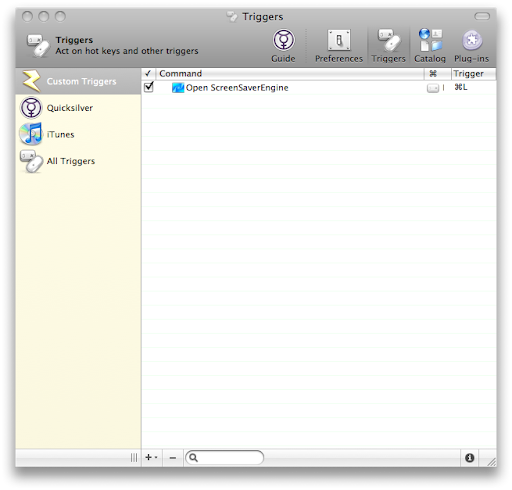
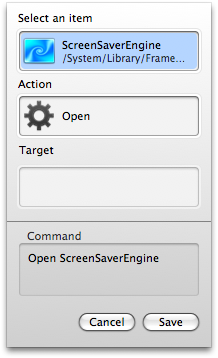
1. In QuickSilver, Create a trigger for /System/Library/Frameworks/ScreenSaver.framework/Resources/ScreenSaverEngine.app, in my case, I use command+L which is easier to remember.

Note: It's a bit weird to create trigger, especially the process to search. For peace of mind, just copy and paste the full path of the ScreenSaverEngine.app:)


Special Thanks to Brian who shared the tips with us in comment:)

2. execute this command in Terminal
/System/Library/CoreServices/"Menu Extras"/User.menu/Contents/Resources/CGSession -suspend


I don't like to use the hot corner to trigger a screen saver anyway. So to normal users use the Locker widget is probably the best approach I have found so far to lock a Mac.

It's weird to me that Apple don't assign a key combination to lock OS X.

Hope this helps.

Friday, November 14, 2008

Switch Oracle BPM (ALBPM) Studio Language

AquaLogic (Fuego) BPM is now part of Oracle BPM Suite and renamed to Oracle BPM.

Back in the 5.x era, the studio IDE is a Swing based app. As far as I know, from 5.7 BEA started to implement i18n for Studio. However, only several languages are available. It can be switched via menu.

From 6.0 whose code name is puma, a new Studio IDE is built on top of Eclipse IDE. In theory it is should support multiligual. However there is not apparent options in the UI to switch language.

A coworker of mine in China asked my that why his ALBPM 6.0 Studio was in Chinese Simplified. And he was not able to change it. After looking at the locale setting which was zh_CN. And he was not willing to change the system locale. So I told him to try switching using eclipse way:) It did work. I then digged further into the installation folder and found it is multilingual in fact.

Tip applicable for version:
ALBPM Studio 6.0.x
Oracle BPM Studio 10gR3 (10.3) which is ALBPM 6.5

How to use:
Windows OS
Edit the Studio shortcut and add the -nl option. It should look like this:
C:\Oracle\OracleBPMStudio\eclipse\eclipse.exe -nl de

*NIX
Assume that we install Studio in /opt folder.
/opt/OracleBPMStudio/eclipse/./eclipse -nl de
Note: In the 10gR3 Studio installatio folder, there is even no icon for the app but a Eclipse icon...

Check the installation folder and you will find the available languages:
C:\OracleBPMStudio\studio\eclipse\plugins
/opt/OracleBPMStudio/studio/eclipse/plugins

en
es
ja
ko
zh
zh_TW
de
fr
it
nl
pt

For more info on Eclipse:
http://help.eclipse.org/ganymede/index.jsp?topic=/org.eclipse.platform.doc.user/tasks/running_eclipse.htm

About Me

Sydney, NSW, Australia
Keep Life Simple and Stupid:)

FriendFeed badge

Tags