GNU/Linux, Virtualization, Open Source, Oracle Fusion Middleware, Knowledge Management, troubleshooting & performance tuning tips.

Showing posts with label ubuntu. Show all posts

Monday, June 1, 2009

Skype Sound Devices settings on Ubuntu (Dell D620/D630)

There are so many different sound architectures and solutions on Linux, like OSS, ALSA and Pulse audio. It seems that ALSA is the dominant one and Pulse is something new to take its place, not sure yet. It is very confusing and frustrating for new users.

I have had bad experience setting up sound input and output with OSS and ALSA earlier. It is not as easy and pleasant as on Mac and Windows.

I am a huge fan of Skype, as the PC to PC call is free and the voice/video quality is excellent. Also because it is cross platform, it is available on iPhone (Skype for iPhone and Fring) and portable devices powered by Windows Mobile or Symbian (e71 using Fring), PSP..., probably more to come.

1 of the most important point to use it is that communications between clients and servers are encrypted by AES without any configuration. So all text and voice chats are secured basically until it reaches PSTN.

For more info:
Why Are Skype Calls encrypted?
Are my Skype calls secure or encrypted?
What type of encryption is used?

Other IMs like Google Talk also offers communication over SSL, but it requires configuration on different client tools like Pidgin, Empathy, InstantBird, Adium or official client. So Skype is still the easiest tool for average crowd.

In fact I switched to Ubuntu from Fedora Core 5 in mid 2006, installed on Dell Latitude D620 which was my working laptop. It went smoothly and I was pretty happy with almost everything except the sound input and output.

I tried to get the built-in mic work in Hardy and Intrepid, but for some reason, I didn't make it. I can hear others talking but they can't hear me because I didn't seem to have the right Sound devices settings for Skype.

After upgrading to 9.04 Jaunty Jackalope in April, I tried to call my wife to test Skype. Holy cow! I found that the Dell Latitude D620 built-in microphone was working with the same Intrepid settings.

Check the settings below, it has been tested and proved to be working on Dell Latitude D620 and D630 with the built-in mic.

Hope this is useful to those who has trouble setting Skype sound devices.

References for Linux sound solutions:
OSS Open Sound System
ALSA Advanced Linux Sound Architecture
PulseAudio

Monday, March 16, 2009

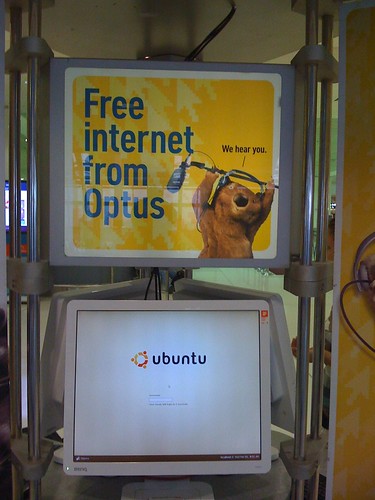
Ubuntu at Sydney Airport

It has been a while since my last post here. 2009 is a busy year for me, it is a shame on me to find more than 20 drafts to be posted:).

I travelled to Shanghai again on March 4, from Sydney. I found the same Free Internet Access machines sponsored by Oputs at Kingsford Smith airport. In fact I discovered this interesting thing last October when I went back to Shanghai to see my family. However, at that time I was in a hurry and I didn't have time play with it.

Operating System: Ubuntu Drapper Drake 6.06 LTS.
Desktop Environment: Gnome
Web Browser: Opera 9

How do I know that?
They did some tricks to limit user controls within a full-screened Opera Web Browser, key combination to switch to other pseudo consoles disabled. For some reason, they forgot to disable the key combination to restart X11 (U know what I am talking about, right?). I can't believe it! Hope they won't see this post:).

BTW:
Dapper Drake was my first Ubuntu version. At that time I was using Fedora Core 5. I have been using Fedora Core (now renamed to Fedora) for the past few years since it's initial release. Later on I decided to move to Debian/Ubuntu because of the APT package management. RPM really sucks.

I am more than happy to see GNU/Linux and open source apps to be used for non-profit or public services. It makes sense to make non-IT people aware that there are choices other than Microsoft Windows, and it's free of charge!

Bon voyage, Ubuntu! Well done, Debian GNU/Linux and the open source community.

Thursday, January 15, 2009

Finally Canonical/Ubuntu fixed the high LCC

Early this morning, I found that there was a new fix for ACPI. After checking the details, I confirmed that a obviously and easy-to-fix bug has finally been fixed after being reported for 2+ years. It was first reported back in September, 2006...

Anyway, it is fixed!

More info:
https://bugs.launchpad.net/ubuntu/+source/acpi-support/+bug/59695

I dug a bit further. The fix is actually a few script hooking up with different mode of ACPI, pretty much doing the same thing as the ugly fix does.

So if you applied the ugly fix, you can delete the ugly fix from ACPI folders:
$sudo rm /etc/acpi/resume.d/99-hdd-ugly-fix.sh
$sudo rm /etc/acpi/start.d/99-hdd-ugly-fix.sh
$sudo rm /etc/acpi/ac.d/99-hdd-ugly-fix.sh
$sudo rm /etc/acpi/battery.d/99-hdd-ugly-fix.sh

In fact we can take a look at the 90-hdparm.sh script, it is more elegant than the ugly fix:) Maybe that's why the author of the ugly fix named it.

Sunday, December 21, 2008

Ubuntu Kills your Laptop HD, Stop it!

It has been a known problem for Ubuntu since 6.06. I have no idea why it hasn't been fixed yet. It does affect 8.10 Intrepid Ibex. Maybe that's the price we pay for open source and freeware:)

I don't want to discuss the technical details about this issue again. For more info on this issue:
http://ubuntuforums.org/showthread.php?p=5031046

Normally, our laptop HD can handle 60000 Load_Cycle. I did see someone's Load_Cycle_Count hits 1 Million+ but his bloody HD is still working. So you'd better check your model specification to make sure.

Check if your HD is affected:

install smartmontools
sudo apt-get install smartmontools

smartctl -a /dev/sda | grep Load_Cycle_Count
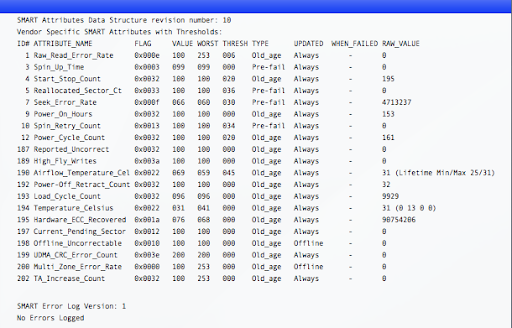
193 Load_Cycle_Count 0x0032 092 092 000 Old_age Always - 87385

Check how fast the LCC is growing. In my case, the LCC grew 30-50 per hour before applying the fix...

If you feel the LCC grows too fast, try the command below and monitor if the LCC stops growing.
$sudo hdparm -B 254 /dev/sda

If it does help, we'll try to make this change permanent.

There are several workaround/fixes for this problem. I recommend using the ugly fix which is a script file hook up with acpi profile. It is easier to manage and roll back.

make a file named "99-hdd-ugly-fix.sh". The important thing is starting with "99".
Code:

$sudo gedit 99-hdd-ugly-fix.sh

make sure the file contains the following lines (fix it if you have PATA HDD):

#!/bin/bash
if on_ac_power; then
# on AC so don't do any head parking
hdparm -B 254 /dev/sda # you might need 255 or a different value
else
# either on battery or power status could not be determined
# so quickly park the head to protect the disk
hdparm -B 128 /dev/sda
fi

copy this file to 4 locations:

$sudo install 99-hdd-ugly-fix.sh /etc/acpi/resume.d/
$sudo install 99-hdd-ugly-fix.sh /etc/acpi/start.d/
$sudo install 99-hdd-ugly-fix.sh /etc/acpi/ac.d/
$sudo install 99-hdd-ugly-fix.sh /etc/acpi/battery.d/

By using install the file 99-hdd-ugly-fix.sh should have the x-bit set. Reboot and all these scripts will start taking effect.

Now it's done, LCC stops growing, peace of mind...

Again, I recommend reading this post before you start, it's very important that you understand what you are going to do. It's all on your own risk:)
http://ubuntuforums.org/showthread.php?p=5031046

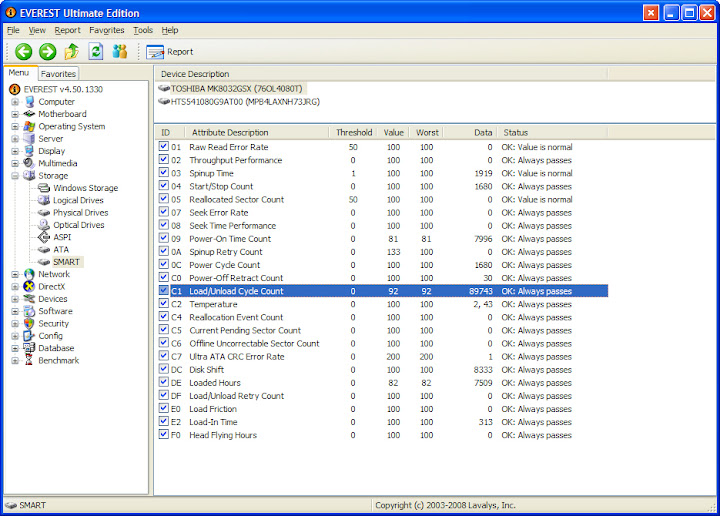
In addition, I'll introduce how to check Load_Cycle_Count in Mac OS X and Windows.

Mac OS X
Install smartctl tool for OS X


Windows
Try Everest

Thursday, November 20, 2008

Too Many Open Files on Ubuntu Linux when installing Oracle BPM

Recently I've been working on VM images for test a test environment based on the new Oracle BPM 10gR3 release and the OS has to be Linux for some reason.

Environment
OS: Ubuntu 8.10 Intrepid Ibex 32-bit
Kernel: 2.6.27-7-generic
JDK: Sun JDK 1.6.0_10
Weblogic Server 10gR3 on JRockit 1.6.0_05 (R27.6.0-50 linux ia32)
(I use the Oracle Service Bus 10gR3 install media which includes WLS)
Oracle 10g XE


We can do it even though Ubuntu is not a supported configuration as per the support matrix. Baiscally all Linux distribution is the same, the only thing matters is the administrator;-)
Interoperability Matrix:
http://www.oracle.com/technology/products/bpm/obpm_config_matrix.html

Note: Create a user for WLS and OBPM is recommended. Using root to install is okay but DO remember to change the owner of the destination to the user created to run WLS and OBPM later. DO NOT use root to run WLS and OBPM in production environment for security.

  1. Launch admin center using root, just use su -s to avoid typing sudo all the time. If not we may encounter permission problems.
    /opt/OracleBPMwlHome/bin/./obpmadmcenter

  2. Click configuration, in Directory tab, click add to create directory. I don't want to talk all the details, please refer to the official installation guide for more details:http://download.oracle.com/docs/cd/E13154_01/bpm/docs65/config_guide/index.html

    Normally this is probably a pain free process (actually it was on Windows as I did it a few days ago)

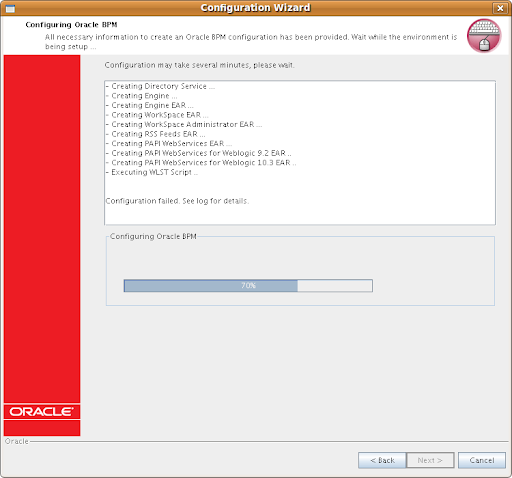
    In this case, the Configuration wizard hang at around 70%, like in the screenshot.

So I checked the WLS logs as well as the Adim Center logs. It seems that errors were encountered when executing WLST. Errors in Admin Center log:

java.io.FileNotFoundException: /opt/bea/user_projects/domains/bpm/config/config.xml (Too many open files)

This is simply due to the default Linux user security limit, by default a user's max open files (per Terminal session) is 1024 on almost all Linux distributions that I am aware of. This default value is the culprit in this case. For WebLogic Server deployment, it is recommended to change the value to at lease 131072 (Oracle Enterprise Linux recommended, changes can be seen by looking into the oracle-validated RPM package).

Session Wide Solution:
Increase the limit of open files using the command ulimit -n 131072 in a Terminal session, start the obpmadmcenter and WLS in the same Terminal session.

Use ulimit -a or ulimit -n to check the new limit. This is just a temporary workaround, you lose the changes once terminal session ends.

Make the change permanent:
Change the file /etc/security/limits.conf (root access required)
Add the following lines, assume user is oracle (the following changes are recomended by Oracle, for Fusion Middleware and Database 10g/11g):

oracle hard nofile 131072
oracle soft nofile 131072
oracle hard nproc 131072
oracle soft nproc 131072
oracle soft core unlimited
oracle hard core unlimited
oracle soft memlock 3500000
oracle hard memlock 3500000
# Recommended stack hard limit 32MB for oracle installations
# oracle hard stack 32768

Start Admin Center, start BPM Web applications, then Weblogic Server. Now you can login to Process Administrator (webconsole) and Workspace and see the sample process if you selected the option.

Alternative workaround(from Official Debian Documentation and Oracle Technology Network):

make the change without rebooting the server box

sysctl -w fs.file-max 65536
sysctl -a
(echo "65536" > /proc/sys/fs/file-max)

To make this change permanent by inserting the kernel parameter in the /etc/sysctl.conf startup file:
# echo "fs.file-max=65536" >> /etc/sysctl.conf

To query the current usage of file handles by using the following:
# cat /proc/sys/fs/file-nr
825 0 65536

Difference between changing the resource limits via ulimit and sysctl:

Basically the priority is: soft limit < style="font-weight: normal;">The Linux kernel provides the getrlimit and setrlimit system calls to get and set resource limits per process. Each resource has an associated soft and hard limit. The soft limit is the value that the kernel enforces for the corresponding resource. The hard limit acts as a ceiling for the soft limit: an unprivileged process may only set its soft limit to a value in the range from 0 up to the hard limit, and (irreversibly) lower its hard limit. A privileged process (one with the CAP_SYS_RESOURCE capability) may make arbitrary changes to either limit value.

Doubt: Why the output from cat /proc/sys/fs/file-nr and lsof | wc -l always different?
Basically, file-nr provides the open File Descriptors (Data Structure, required handle when applications try to open a file) while lsof outputs Open Files including those NOT using File Descriptors (e.g. current working directory, library files mapped into memory, executable text file etc...).

Generally speaking, lsof of a process always > process's open file descriptors

Do a quick test on your system:
Get Firefox's pid

Get number of opened files by Firefox
lsof -p pid | wc -l
Or
lsof | grep pid | wc -l

Check Firefox process's File Descriptors
ls /proc/pid/fd | wc -l

Compare, got it?
Note: Loaded Library files can be checked by digging into /proc/pid/maps

For Oracle Enterprise Linux and Red Hat Enterprise Linux
Install the oracle-validated package which will resolve all Oracle Fusion Middleware and Database required dependencies and system configurations. Simple run yum install oracle-validated or download the rpm and manually install it!

Tips: Install OpenSSH for easy management as a VM. If you prefer Web UI, try webmin it is also a good tool for overall management. I install webmin on each of my Ubuntu Server VM or box.

References:

Friday, November 14, 2008

Switch Oracle BPM (ALBPM) Studio Language

AquaLogic (Fuego) BPM is now part of Oracle BPM Suite and renamed to Oracle BPM.

Back in the 5.x era, the studio IDE is a Swing based app. As far as I know, from 5.7 BEA started to implement i18n for Studio. However, only several languages are available. It can be switched via menu.

From 6.0 whose code name is puma, a new Studio IDE is built on top of Eclipse IDE. In theory it is should support multiligual. However there is not apparent options in the UI to switch language.

A coworker of mine in China asked my that why his ALBPM 6.0 Studio was in Chinese Simplified. And he was not able to change it. After looking at the locale setting which was zh_CN. And he was not willing to change the system locale. So I told him to try switching using eclipse way:) It did work. I then digged further into the installation folder and found it is multilingual in fact.

Tip applicable for version:
ALBPM Studio 6.0.x
Oracle BPM Studio 10gR3 (10.3) which is ALBPM 6.5

How to use:
Windows OS
Edit the Studio shortcut and add the -nl option. It should look like this:
C:\Oracle\OracleBPMStudio\eclipse\eclipse.exe -nl de

*NIX
Assume that we install Studio in /opt folder.
/opt/OracleBPMStudio/eclipse/./eclipse -nl de
Note: In the 10gR3 Studio installatio folder, there is even no icon for the app but a Eclipse icon...

Check the installation folder and you will find the available languages:
C:\OracleBPMStudio\studio\eclipse\plugins
/opt/OracleBPMStudio/studio/eclipse/plugins

en
es
ja
ko
zh
zh_TW
de
fr
it
nl
pt

For more info on Eclipse:
http://help.eclipse.org/ganymede/index.jsp?topic=/org.eclipse.platform.doc.user/tasks/running_eclipse.htm

Wednesday, October 22, 2008

Install Ubuntu from USB Stick, Stop odering free Ubuntu CDs

Ubuntu 8.10, Intrepid Ibex is around the corner. I saw the news among my RSS subscriptions that we can now pre-order free Ubuntu 8.10 CDs now.

In the past few years, I have applied for 6.0.6 LTS CDs for x86, x86-64, powerpc, sparc(actually it's not possible for me to have a sparc powered machine at home, why I need this?), 7.04 CDs x86, x86-64 when I was working and living in Shanghai, China. In addition to the CDs, some stickers were in the package. They were posted from Europe and the postage was around several euros. The total cost would not be cheap.

To be open, I applied for Solaris 10(sparc + x86) free DVDs from Sun and got 2. I didn't feel guilty because after all Sun Microsystem is a commercial company. They have enough budget for things like this.

Later on, I found these CDs were useless to me, I hardly use them. Finally I gave all them away to my colleagues who were interested in trying Linux. I think it was a good result. It seemed that I used them to show that I am a GNU/Linux, Open Source supporter rather than install and spead. In fact I use the downloaded ISO image as well as bootable USB stick created via UNetbootin much more often.

I think it was something stupid. I requested for something useless to me, whilst it's a waste of Canonical's money as well as their limited resources.

Here I suggest that Ubuntu as well as other distros users try using USB installtion. It's much faster, cost effective, reusable and environmental friendly. I assume that now most machines support boot from USB devices.

Basically, we can create a bootable Linux distro USB stick by using UNetbootin (Universal NetBook Installer)/Ubuntu Live USB Creator/Live USB System Creator to create a bootable USB stick. I personally prefer to use UNetbootin. It's with a GUI and available on Linux and Windows. So easy to use.

In brief what UNetbootin can do for us:
1. Download the distro image automatically and install the distro to a USB stick, it's bootable. If we install distros like Ubuntu which supports LiveCD installation, of course you can now boot and install from the stick.
2. Already have the image? Just do it on the fly by choosing image and specify the path.
3. Advanced options, custom...

UNetBootin: http://unetbootin.sourceforge.net

More info: Install from USB Stick

Stop requesting useless CDs and save money for Canonical, leave the free CDs for people in real need, those who can't afford a USB stick and CD/DVD burner, those who don't have easy+fast internet access, those who...

That's what we can to do to spread Ubuntu - Linux for Human Beings. Also, stop burning useless CD/DVDs to protect our environment, our earth.

About Me

Sydney, NSW, Australia
Keep Life Simple and Stupid:)

FriendFeed badge

Tags