GNU/Linux, Virtualization, Open Source, Oracle Fusion Middleware, Knowledge Management, troubleshooting & performance tuning tips.

Monday, June 7, 2010

Smart Update Error on Linux

I recently hit a SSL Handshake error when trying to apply a WebLogic Portal patch using Smart Update.

Smart Update simply tells that "Cannot verify account status", however, obviously my account is valid.

Environment:
Linux 2.6.32 x86_64 (on x86 probably the same, if not plz let me know)
Sun Java6 JDK 1.6.0_20
Oracle JRockit Mission Control 4.0.0 x86_64
WebLogic Portal 10.3.2 Sunshine release on top of WebLogic Server 10.3.2.0

Checking the Error Message in the stdout, you'll see something like below:

root@lucid:/opt/Oracle/Middleware/utils/bsu# ./bsu.sh
javax.xml.rpc.ServiceException: Error processing WSDL document:
javax.net.ssl.SSLHandshakeException: sun.security.validator.ValidatorException: PKIX path validation failed: java.security.cert.CertPathValidatorException: algorithm check failed: MD2withRSA is disabled
at org.apache.axis.client.Service.initService(Service.java:250)
at org.apache.axis.client.Service.(Service.java:165)
at org.apache.axis.client.ServiceFactory.createService(ServiceFactory.java:198)
at com.bea.plateng.patch.AbstractPatchServicesImpl.init(AbstractPatchServicesImpl.java:90)
at com.bea.plateng.patch.DefaultPatchProducerServicesImpl.(DefaultPatchProducerServicesImpl.java:8)
at sun.reflect.NativeConstructorAccessorImpl.newInstance0(Native Method)
at sun.reflect.NativeConstructorAccessorImpl.newInstance(NativeConstructorAccessorImpl.java:39)
at sun.reflect.DelegatingConstructorAccessorImpl.newInstance(DelegatingConstructorAccessorImpl.java:27)
at java.lang.reflect.Constructor.newInstance(Constructor.java:513)
at com.bea.plateng.patch.PatchServicesFactory.create(PatchServicesFactory.java:180)
at com.bea.plateng.patch.PatchLoginManager.login(PatchLoginManager.java:90)
at com.bea.plateng.patch.gui.PatchGUIHelper$1.call(PatchGUIHelper.java:192)
at com.bea.plateng.patch.gui.PatchGUIHelper$1.call(PatchGUIHelper.java:189)
at java.util.concurrent.FutureTask$Sync.innerRun(FutureTask.java:303)
at java.util.concurrent.FutureTask.run(FutureTask.java:138)
at java.util.concurrent.ScheduledThreadPoolExecutor$ScheduledFutureTask.access$301(ScheduledThreadPoolExecutor.java:98)
at java.util.concurrent.ScheduledThreadPoolExecutor$ScheduledFutureTask.run(ScheduledThreadPoolExecutor.java:207)
at java.util.concurrent.ThreadPoolExecutor$Worker.runTask(ThreadPoolExecutor.java:886)
at java.util.concurrent.ThreadPoolExecutor$Worker.run(ThreadPoolExecutor.java:908)
at java.lang.Thread.run(Thread.java:619)

Cause

Aha, we caught the fish: javax.net.ssl.SSLHandshakeException: sun.security.validator.ValidatorException: PKIX path validation failed: java.security.cert.CertPathValidatorException: algorithm check failed: MD2withRSA is disabled

The problem is happening with latest version of Sun JDK from 160_18 onwards, Sun has disabled “MD2withRSA” with latest version of JDK’s stating that its vulnerability. This is Defect 9776340 in WebLogic.

Workaround

Use JRockit as the JVM instead. Suppose JRockit is installed in /opt/jrmc-4.0.0-1.6.0

1. Session Wide (temporary)

Open a terminal, set session wide environment variables:

export JAVA_HOME=/opt/jrmc-4.0.0-1.6.0/jre
export CLASSPATH=.
export PATH=$JAVA_HOME/bin:$PATH

run ./bsu.sh from this Termial

java -jar patch-client.jar

2. Permanent workaround

edit utils/bsu.sh

update JAVA_HOME

JAVA_HOME="/opt/jrmc-4.0.0-1.6.0/jre"

Run

./bsu.sh

Reference:

http://forums.oracle.com/forums/thread.jspa?threadID=1066924

Friday, September 25, 2009

WebCenter Interaction 10gR3 Patch 1

AFAIK, this is the first patchset for ALUI/WCI done by Oracle after the BEA acquisition.

I have to say that the new versioning in line with Oracle Database or Fusion middleware is a bit confusing to old Plumtree and ALUI customers.

In fact, WCI 10gR3 (10.3.0.0.0) is equivalent to ALI 6.5 MP2 (6.5.2). So 10gR3 patch 1 is equivalent to 10.3.0.1.0.

Yesterday, Oracle announced the release of 10.3.0.1 of WebCenter Interaction and Collaboration a patch release on top of the 10gR3 versions of each product. These patch releases contain a set of bug fixes related to each product as well as a new Desktop Integration feature for Collaboration called the Office Task Bar Panel. Each of the bugs that have been fixed are listed and summarized within the Release Notes for each product. Links to each can be found below:

WCI 10.3.0.1 Release Notes

WebCenter Collaboration 10.3.0.1 Release Notes

The patches for all certified operating systems are now available on Metalink (soon to be My Oracle Support).

Log into Metalink and go to the Patches & Updates tab, and do a Simple Search for patch number 8935278 (WCI) or 8935708 (WCC) and you can download the patch.

Follow the instructions in the Upgrade Guide for WCI 10.3.0.1.0 to perform the upgrade. Have fun!

It looks like 10gR3 (6.5) branch is still being maintained by Oracle. Also, based on the SOD documenent from Oracle website, there will be 11g release for WCI to replace the 10gR3 in WebCenter Suite 11gR1 stack. Let's wait and see.

Monday, June 1, 2009

Skype Sound Devices settings on Ubuntu (Dell D620/D630)

There are so many different sound architectures and solutions on Linux, like OSS, ALSA and Pulse audio. It seems that ALSA is the dominant one and Pulse is something new to take its place, not sure yet. It is very confusing and frustrating for new users.

I have had bad experience setting up sound input and output with OSS and ALSA earlier. It is not as easy and pleasant as on Mac and Windows.

I am a huge fan of Skype, as the PC to PC call is free and the voice/video quality is excellent. Also because it is cross platform, it is available on iPhone (Skype for iPhone and Fring) and portable devices powered by Windows Mobile or Symbian (e71 using Fring), PSP..., probably more to come.

1 of the most important point to use it is that communications between clients and servers are encrypted by AES without any configuration. So all text and voice chats are secured basically until it reaches PSTN.

For more info:
Why Are Skype Calls encrypted?
Are my Skype calls secure or encrypted?
What type of encryption is used?

Other IMs like Google Talk also offers communication over SSL, but it requires configuration on different client tools like Pidgin, Empathy, InstantBird, Adium or official client. So Skype is still the easiest tool for average crowd.

In fact I switched to Ubuntu from Fedora Core 5 in mid 2006, installed on Dell Latitude D620 which was my working laptop. It went smoothly and I was pretty happy with almost everything except the sound input and output.

I tried to get the built-in mic work in Hardy and Intrepid, but for some reason, I didn't make it. I can hear others talking but they can't hear me because I didn't seem to have the right Sound devices settings for Skype.

After upgrading to 9.04 Jaunty Jackalope in April, I tried to call my wife to test Skype. Holy cow! I found that the Dell Latitude D620 built-in microphone was working with the same Intrepid settings.

Check the settings below, it has been tested and proved to be working on Dell Latitude D620 and D630 with the built-in mic.

Hope this is useful to those who has trouble setting Skype sound devices.

References for Linux sound solutions:
OSS Open Sound System
ALSA Advanced Linux Sound Architecture
PulseAudio

Wednesday, March 25, 2009

Oracle BPM (ALBPM) Resources

This is a quick post to put all publicly available Oracle BPM resources all together to avoid wasting time doing pointless searches.

Technical Forums:
Oracle Business Process Management Suite

Forum in Simplified Chinese:
http://cn.forums.oracle.com/forums/forum.jspa?forumID=315

Downloads:
http://www.oracle.com/technology/software/products/bpm/index.html

or go to http://edelivery.oracle.com/

Documentations:


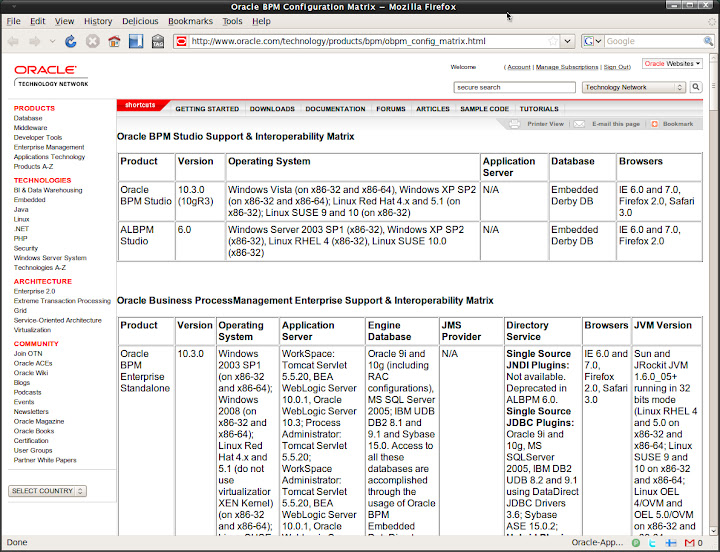
Oracle BPM Configuration Matrix

10gR3
http://download.oracle.com/docs/cd/E13154_01/bpm/docs65/index.html

Docs for previous version are no longer available on edocs.bea.com for some reason. Well, we can still access them via the links below. But I have no idea how long they are going to last.

6.0
http://edocs.bea.com/albsi/docs60/index.html

5.7
http://edocs.bea.com/albsi/docs57/index.html

5.5
http://edocs.bea.com/albsi/docs55/index.html

Patches:

Where to download Oracle BPM patches now?

Tuesday, March 17, 2009

Linux omitted by banks

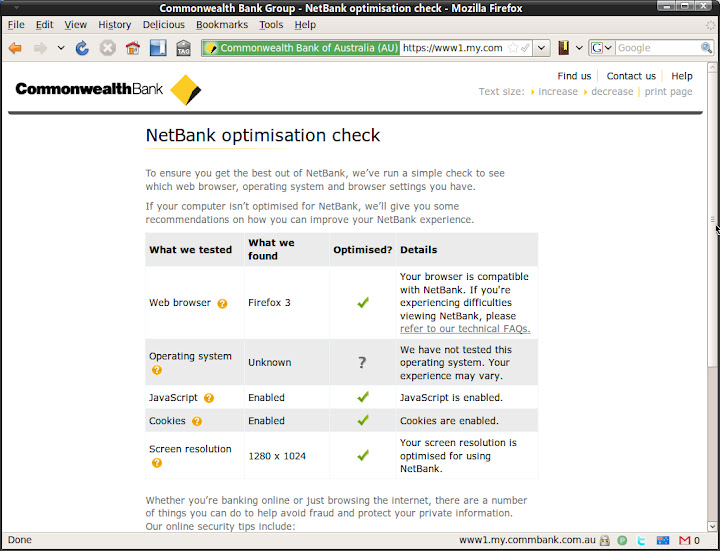
Yesterday I played around the newly enhanced Netbank of Commonwealth Bank (CBA). Generally speaking, the new UI is good. Although it is not working very well when zoomed in. Also, the new web edition for iPhone is fully functioning now. It's good to see banks are doing someting in this economic downturn.

Something weird I found when clicking on Run Optimization Check link.


I found this matrix from the link: FAQ

The system requirements to use NetBank are:
Browser

Operating System


Windows 2000

Windows XP

MAC OSX

Vista

Internet Explorer 6 SP2


Internet Explorer 7


Mozilla Firefox 2


Mozilla Firefox 3


Safari 2


Safari 3


I understand that GNU/Linux is not a mainstream OS for ordinary users, market share is close to 1%. As a *NIX fan, I still feel uncomfortable to see Linux being ignored. The fact is that Mozilla Firefox itself is cross platform. As a result, all OS Firefox supports should be supported, right?

In fact, I use Linux + Firefox or Opera (swith to Chrome for Linux later this year) to access Netbank and other web based internet banking services most of the time, 90%+. It is actually a supported platform. The Netbank team should be able to do the compatibility test, resource should not a problem. If not, I would be more than happy to be a tester as if CBA offers me a VIP account or something like that:)

BTW: Of course I am still with some stupid banks who are still with IE + ActiveX combination and Windows only client. It sucks. My workaround is to run a guest Windows instance.

CBA is not the the only bank that omits GNU/Linux. Here I am not criticising CBA. I wish in the future the banks can take Linux into their account when doing compatibility test.

We all know that Linux is quite something, it is going to make a big noise in the OS market soon. Please do not omit it.

Monday, March 16, 2009

Ubuntu at Sydney Airport

It has been a while since my last post here. 2009 is a busy year for me, it is a shame on me to find more than 20 drafts to be posted:).

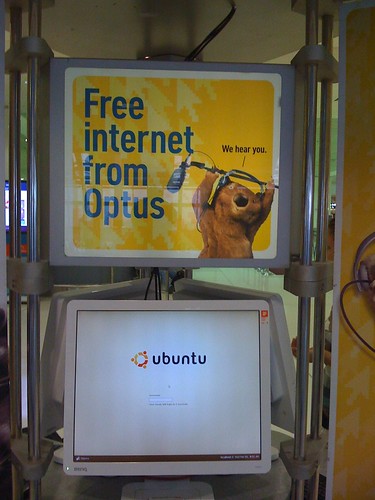
I travelled to Shanghai again on March 4, from Sydney. I found the same Free Internet Access machines sponsored by Oputs at Kingsford Smith airport. In fact I discovered this interesting thing last October when I went back to Shanghai to see my family. However, at that time I was in a hurry and I didn't have time play with it.

Operating System: Ubuntu Drapper Drake 6.06 LTS.
Desktop Environment: Gnome
Web Browser: Opera 9

How do I know that?
They did some tricks to limit user controls within a full-screened Opera Web Browser, key combination to switch to other pseudo consoles disabled. For some reason, they forgot to disable the key combination to restart X11 (U know what I am talking about, right?). I can't believe it! Hope they won't see this post:).

BTW:
Dapper Drake was my first Ubuntu version. At that time I was using Fedora Core 5. I have been using Fedora Core (now renamed to Fedora) for the past few years since it's initial release. Later on I decided to move to Debian/Ubuntu because of the APT package management. RPM really sucks.

I am more than happy to see GNU/Linux and open source apps to be used for non-profit or public services. It makes sense to make non-IT people aware that there are choices other than Microsoft Windows, and it's free of charge!

Bon voyage, Ubuntu! Well done, Debian GNU/Linux and the open source community.

Thursday, February 26, 2009

Where to download Oracle BPM patches now?

The legacy BEA site will be ditched soon. We can see that http://albpmsupport.bea.com is no longer updated. Latest Oracle BPM patches are not listed there any more.

All Oracle customers are redirected to Metalink for all product support and patches.

After logging in Metalink, do a quick search with keywords 'albpm hotfix' and there will be a KB article with instructions on how to download Oracle BPM patches from 5.5 to 10gR3 or above.

Subject: How to download Oracle BPM (OBPM) patch (HotFix ) or patchset / maintenance or service Pack (MP / SP) using Oracle Metalink.

Steps:
  • Once logged in the Metalink, click on “Patches and Updates”
  • Click on “Advanced Search”
  • Product or Product Family: Click on the flashlight, on the search window enter “BPM” and click “Go”. The search result should show “Oracle Business Process Management Suite (beaalbpm)” product. Check the “Select” box (or click on “Check all”) and click on “Select” button.
  • Now you should see Oracle Business Process Management Suite (beaalbpm) in the Product or Product Family search field.
  • Select the Release: click on the flashlight near the “Release” search field and choose the appropriate version.
  • Ignore the rest of the search criteria and click “Go”
  • You should get all the list of available Oracle BPM patches and patchsets.
  • Please verify the build number, the product (Studio, Enterprise SA and EnterpriseJEE) and the type (Patch / Hotfix or Patchset / MP ).
Hope this helps the confused and frustrated users.

Thursday, January 29, 2009

Oracle BPM 10gR3 MP1 and hotfix

It was release on Jan/6/2009. As published on legacy BEA website, some of you guys may not be aware of the existence of the Maintenance Pack.

Again, please check http://albpmsupport.bea.com on a regular basis if you work on OBPM. One thing I don't understand is that why don't use a better publishing platform for the patch-set/hotfix site? Even a RSS feed would be much nicer in such a Web 2.0 era, it's easy!

10gR3 MP1 which is 10.3.1.0.0.
http://www.oracle.com/technology/software/products/bpm/index.html

It's good to find a direct link without using edelivery to download the media.

I am surprised to see the final birth of a official Mac OS X version of Studio for 10gR3 MP1 for Mac OS X. I am not a big Mac fan, but I am still glad to see OS X is supported by Oracle, maybe later OS X server, you reckon?

It seems that the newly supported platform hasn't been added to all of the release notes yet. Even the recommended official config matrix page, it has been weeks after the release...
check:

Enjoy! A late happy new year to all of you who is lucky enough to see this post!^_^

Thursday, January 15, 2009

Finally Canonical/Ubuntu fixed the high LCC

Early this morning, I found that there was a new fix for ACPI. After checking the details, I confirmed that a obviously and easy-to-fix bug has finally been fixed after being reported for 2+ years. It was first reported back in September, 2006...

Anyway, it is fixed!

More info:
https://bugs.launchpad.net/ubuntu/+source/acpi-support/+bug/59695

I dug a bit further. The fix is actually a few script hooking up with different mode of ACPI, pretty much doing the same thing as the ugly fix does.

So if you applied the ugly fix, you can delete the ugly fix from ACPI folders:
$sudo rm /etc/acpi/resume.d/99-hdd-ugly-fix.sh
$sudo rm /etc/acpi/start.d/99-hdd-ugly-fix.sh
$sudo rm /etc/acpi/ac.d/99-hdd-ugly-fix.sh
$sudo rm /etc/acpi/battery.d/99-hdd-ugly-fix.sh

In fact we can take a look at the 90-hdparm.sh script, it is more elegant than the ugly fix:) Maybe that's why the author of the ugly fix named it.

Wednesday, January 14, 2009

Can't apply patches for Oracle BPM (ALBPM) Studio on Windows?

The first hot fix and service pack for Oracle BPM 10gR3 were released. If you do a quick search on Google, you'll surprisingly found that it is still published on BEA web site for some reason.

I did noticed that folks run into problems applying the hot fix. I am not sure if there is any customer out there who is using this release. However, as it is first release under Oracle, it shoud have drew enough attention of the public. Besides, bloody Windows still owns almost 80% of the OS market. So I reckon that this post won't be a waste of time anyway.

Finally we got something officially, this is a known issue for Studio(Windows only).

Symptom: Errors will be encountered when applying hot fix for OBPM studio 10gR3 GA.
"Files in use by another application. Stop all BPM applications before installing this update.
Detail:The following file could not be modified: C:\Oracle\BPMStudio\lib\fuego.boot.jar."

Solution:
1. shutdown Studio
2. download the fuego.boot.jar(MP0 hotfix) or fuego.boot.jar(MP1) file listed in the download website for your particular update.
3. copy the downloaded fuego.boot.jar file to studio_installation_dir/lib
4.start Studio
5. apply either the HF

Note: There are 2 different fuego.boot.jar files. This needs to be done only once for 10gR3 GA. After you have applied the hotfix or or pactchset(MP), you don't need to do it again.

Check Help - About for version info: 10.3.0.0.0 Build #94551 or 10.3.1.0 Build #94375

For more info, check this out:
http://albpmsupport.bea.com/download/10gR3/10gR3Studio.jsp

More updates:
If you try to upgrade from ALBPM 6.0 MP4 to MP5, you'll probably run into the same issue.


"This HotFix cannot be applied to this product version. Detail: Current Version: 4 - HotFix Service Pack Version: 5".


The workaround is to shutdown Studio, copy the fuego.boot.jar file from STUDIO_INSTALL_DIR/studio/studio/eclipse/plugins/fuego.boot_6.0.0 to STUDIO_INSTALL_DIR/lib, overwrite the one there. Start Studio and apply the hot fix again.
replace the one in /lib

Sunday, December 21, 2008

Ubuntu Kills your Laptop HD, Stop it!

It has been a known problem for Ubuntu since 6.06. I have no idea why it hasn't been fixed yet. It does affect 8.10 Intrepid Ibex. Maybe that's the price we pay for open source and freeware:)

I don't want to discuss the technical details about this issue again. For more info on this issue:
http://ubuntuforums.org/showthread.php?p=5031046

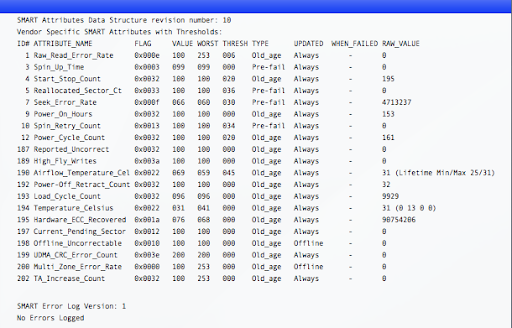
Normally, our laptop HD can handle 60000 Load_Cycle. I did see someone's Load_Cycle_Count hits 1 Million+ but his bloody HD is still working. So you'd better check your model specification to make sure.

Check if your HD is affected:

install smartmontools
sudo apt-get install smartmontools

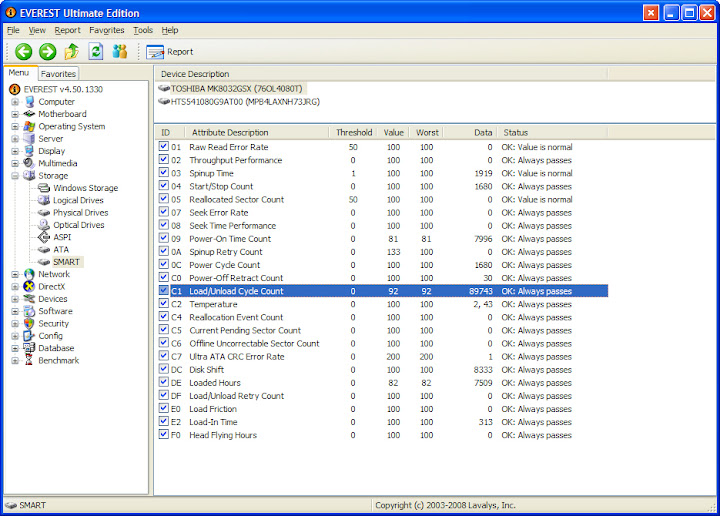
smartctl -a /dev/sda | grep Load_Cycle_Count
193 Load_Cycle_Count 0x0032 092 092 000 Old_age Always - 87385

Check how fast the LCC is growing. In my case, the LCC grew 30-50 per hour before applying the fix...

If you feel the LCC grows too fast, try the command below and monitor if the LCC stops growing.
$sudo hdparm -B 254 /dev/sda

If it does help, we'll try to make this change permanent.

There are several workaround/fixes for this problem. I recommend using the ugly fix which is a script file hook up with acpi profile. It is easier to manage and roll back.

make a file named "99-hdd-ugly-fix.sh". The important thing is starting with "99".
Code:

$sudo gedit 99-hdd-ugly-fix.sh

make sure the file contains the following lines (fix it if you have PATA HDD):

#!/bin/bash
if on_ac_power; then
# on AC so don't do any head parking
hdparm -B 254 /dev/sda # you might need 255 or a different value
else
# either on battery or power status could not be determined
# so quickly park the head to protect the disk
hdparm -B 128 /dev/sda
fi

copy this file to 4 locations:

$sudo install 99-hdd-ugly-fix.sh /etc/acpi/resume.d/
$sudo install 99-hdd-ugly-fix.sh /etc/acpi/start.d/
$sudo install 99-hdd-ugly-fix.sh /etc/acpi/ac.d/
$sudo install 99-hdd-ugly-fix.sh /etc/acpi/battery.d/

By using install the file 99-hdd-ugly-fix.sh should have the x-bit set. Reboot and all these scripts will start taking effect.

Now it's done, LCC stops growing, peace of mind...

Again, I recommend reading this post before you start, it's very important that you understand what you are going to do. It's all on your own risk:)
http://ubuntuforums.org/showthread.php?p=5031046

In addition, I'll introduce how to check Load_Cycle_Count in Mac OS X and Windows.

Mac OS X
Install smartctl tool for OS X


Windows
Try Everest

Sunday, November 30, 2008

Free Dictionary solution for iPhone - use Stardict dictionaries for weDict

As a non native English speaker, I need good English-English dictionaries not only on my Laptop/desktop but also in my pocket.

On Treo 650, there is Zdic (free and opensouce app written by Chinese folks) with all kinds of free .pdb format dictionaries, works perfectly on Palm OS. I really miss the good part of Treo and Palm OS. While Palm is dying and hopeless, I have to choose my new platform. Early November I bought my new iPhone 3g 8G, simply because I am a *nix lover, its overall specifications meet my needs. In addtion, I don't take Windows (Mobile/CE) into account anyway.

As a result, I have to find a new bunch of apps and research the OS X mobile a bit. Fortunately it is a trimmed version of OS X, not hard for me at all.

Works for:
iPhone firmware 2.1 2.2
weDict 1.1 /weDict Pro 1.2 (works for 1.3 as well)

Note: if you upgrade weDictPro, custom added dictionaries will be kept.

Prerequisites:
  1. Jailbreak it
    use PWNageTool on Mac or QuickPWN on Windows, recommend using Cydia as package management tool, for more info, google please.
  2. OpenSSH installed and service started
    Use Cydia to install, search openssh package. ATP will take care of the installation and dependencies. In addition, I strongly recommend that we install Terminal/Finder/BossPrefs/SBSettings.
  3. Download the dictionaries you want in any language
    http://stardict.sourceforge.net/Dictionaries.php
  4. iPhone connected to the same wireless network as you Desktop/Laptop
    Get the LAN IP address, we need to use SSH.
  5. Any SSH tool
    Cyberduck or FileZilla for OS X
    Filezilla for Linux
    WinSCP/Filezilla for Windows
Hereby I use LDOCE as an example, it works for all other Stardict re-packed dictionaries.
1. Extrac stardict-longman-2.4.2.tar.bz2
2. Rename longman.dict.dz to longman.dict.gz or zip
3. Extrace and get longman.dict
4. Copy longman.idx and longman.ifo to /private/var/mobile/Applications/BFEA9FDA-0903-4321-9A7D-1A0DA030FF21/Documents folder (red+bold string varies on different devices, it may take some time to dig the right folder)
5. Change their attributes to 755 (-rwxr-x-r-x)
6. Launch weDict/weDict Pro, tap config button on bottom right, newly added dictionaries should be listed. Check the screen shot below:


If you don't like the dict name, you can double tap on the name and change it to whatever you like. If for some reason they are not listed, check the prefix for the dictionary file, make sure they are the same. Hold Home for 6 seconds to force exit the app, check again, it should work.


Difference between weDict Pro and weDict:
The Pro version has a built-in FTP service based on DiddyFTPServer, used to upload dictionaries . It's actually pointing to the same folder as I mentioned in the steps. And it is also capable to download dictionaries from a URL.

Also some one said performance of the free version is poorer than Pro, I don't know if it's true. Anyway, it's only 6 bucks.

Fore more info:
http://app.weiphone.com/wedict/index.html

Hope this helps. iPhone is excellent:)

Thursday, November 20, 2008

Too Many Open Files on Ubuntu Linux when installing Oracle BPM

Recently I've been working on VM images for test a test environment based on the new Oracle BPM 10gR3 release and the OS has to be Linux for some reason.

Environment
OS: Ubuntu 8.10 Intrepid Ibex 32-bit
Kernel: 2.6.27-7-generic
JDK: Sun JDK 1.6.0_10
Weblogic Server 10gR3 on JRockit 1.6.0_05 (R27.6.0-50 linux ia32)
(I use the Oracle Service Bus 10gR3 install media which includes WLS)
Oracle 10g XE


We can do it even though Ubuntu is not a supported configuration as per the support matrix. Baiscally all Linux distribution is the same, the only thing matters is the administrator;-)
Interoperability Matrix:
http://www.oracle.com/technology/products/bpm/obpm_config_matrix.html

Note: Create a user for WLS and OBPM is recommended. Using root to install is okay but DO remember to change the owner of the destination to the user created to run WLS and OBPM later. DO NOT use root to run WLS and OBPM in production environment for security.

  1. Launch admin center using root, just use su -s to avoid typing sudo all the time. If not we may encounter permission problems.
    /opt/OracleBPMwlHome/bin/./obpmadmcenter

  2. Click configuration, in Directory tab, click add to create directory. I don't want to talk all the details, please refer to the official installation guide for more details:http://download.oracle.com/docs/cd/E13154_01/bpm/docs65/config_guide/index.html

    Normally this is probably a pain free process (actually it was on Windows as I did it a few days ago)

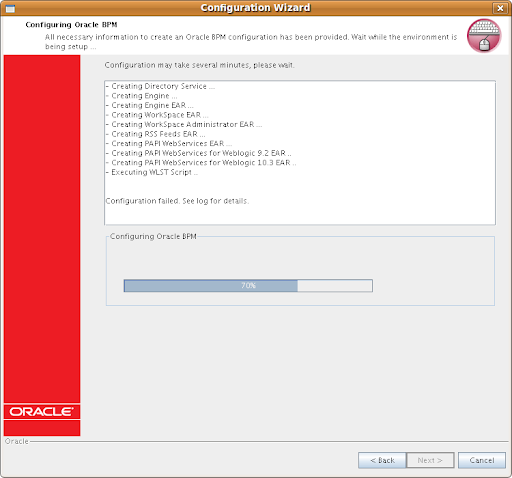
    In this case, the Configuration wizard hang at around 70%, like in the screenshot.

So I checked the WLS logs as well as the Adim Center logs. It seems that errors were encountered when executing WLST. Errors in Admin Center log:

java.io.FileNotFoundException: /opt/bea/user_projects/domains/bpm/config/config.xml (Too many open files)

This is simply due to the default Linux user security limit, by default a user's max open files (per Terminal session) is 1024 on almost all Linux distributions that I am aware of. This default value is the culprit in this case. For WebLogic Server deployment, it is recommended to change the value to at lease 131072 (Oracle Enterprise Linux recommended, changes can be seen by looking into the oracle-validated RPM package).

Session Wide Solution:
Increase the limit of open files using the command ulimit -n 131072 in a Terminal session, start the obpmadmcenter and WLS in the same Terminal session.

Use ulimit -a or ulimit -n to check the new limit. This is just a temporary workaround, you lose the changes once terminal session ends.

Make the change permanent:
Change the file /etc/security/limits.conf (root access required)
Add the following lines, assume user is oracle (the following changes are recomended by Oracle, for Fusion Middleware and Database 10g/11g):

oracle hard nofile 131072
oracle soft nofile 131072
oracle hard nproc 131072
oracle soft nproc 131072
oracle soft core unlimited
oracle hard core unlimited
oracle soft memlock 3500000
oracle hard memlock 3500000
# Recommended stack hard limit 32MB for oracle installations
# oracle hard stack 32768

Start Admin Center, start BPM Web applications, then Weblogic Server. Now you can login to Process Administrator (webconsole) and Workspace and see the sample process if you selected the option.

Alternative workaround(from Official Debian Documentation and Oracle Technology Network):

make the change without rebooting the server box

sysctl -w fs.file-max 65536
sysctl -a
(echo "65536" > /proc/sys/fs/file-max)

To make this change permanent by inserting the kernel parameter in the /etc/sysctl.conf startup file:
# echo "fs.file-max=65536" >> /etc/sysctl.conf

To query the current usage of file handles by using the following:
# cat /proc/sys/fs/file-nr
825 0 65536

Difference between changing the resource limits via ulimit and sysctl:

Basically the priority is: soft limit < style="font-weight: normal;">The Linux kernel provides the getrlimit and setrlimit system calls to get and set resource limits per process. Each resource has an associated soft and hard limit. The soft limit is the value that the kernel enforces for the corresponding resource. The hard limit acts as a ceiling for the soft limit: an unprivileged process may only set its soft limit to a value in the range from 0 up to the hard limit, and (irreversibly) lower its hard limit. A privileged process (one with the CAP_SYS_RESOURCE capability) may make arbitrary changes to either limit value.

Doubt: Why the output from cat /proc/sys/fs/file-nr and lsof | wc -l always different?
Basically, file-nr provides the open File Descriptors (Data Structure, required handle when applications try to open a file) while lsof outputs Open Files including those NOT using File Descriptors (e.g. current working directory, library files mapped into memory, executable text file etc...).

Generally speaking, lsof of a process always > process's open file descriptors

Do a quick test on your system:
Get Firefox's pid

Get number of opened files by Firefox
lsof -p pid | wc -l
Or
lsof | grep pid | wc -l

Check Firefox process's File Descriptors
ls /proc/pid/fd | wc -l

Compare, got it?
Note: Loaded Library files can be checked by digging into /proc/pid/maps

For Oracle Enterprise Linux and Red Hat Enterprise Linux
Install the oracle-validated package which will resolve all Oracle Fusion Middleware and Database required dependencies and system configurations. Simple run yum install oracle-validated or download the rpm and manually install it!

Tips: Install OpenSSH for easy management as a VM. If you prefer Web UI, try webmin it is also a good tool for overall management. I install webmin on each of my Ubuntu Server VM or box.

References:

Monday, November 17, 2008

Always Remember to Lock your Computer Windows/Linux/Mac OS X

It's always important to lock your computer when you are away from it, even for a short while. I do see a lot of my friends, colleagues they just don't do this. They are not aware of the impact of a malicious attempt. You never know what happened until you find something weird happened to you data/bank account or things like that.

I formed this good habit when I was working for company M. At that time, if you don't lock you computer and was noticed by anyone an invitation email to all team members for lunch or dinner will be sent out. Well, it's no good to you wallet:(


Windows Family
Hotkey/Shortcut
Win+L or Ctrl+Alt+Del and press L

GNU/Linux
Ctrl+Alt+L
Note: at least this works on Debian/Ubuntu and Fedora Core series, GNOME Desktop Environment. Not sure if it applies to all distributions as they may use different desktop environment like KDE, XFCE, WM...

If you use GNOME, you can also add Lock screen applet and to do the same by clicking it.

Mac OS X
Use the Free locker widget in Dashboard, the fastest way would be F12 - > Double click on Lock widget.

Download: http://www.apple.com/downloads/dashboard/networking_security/locker.html

Alternative:
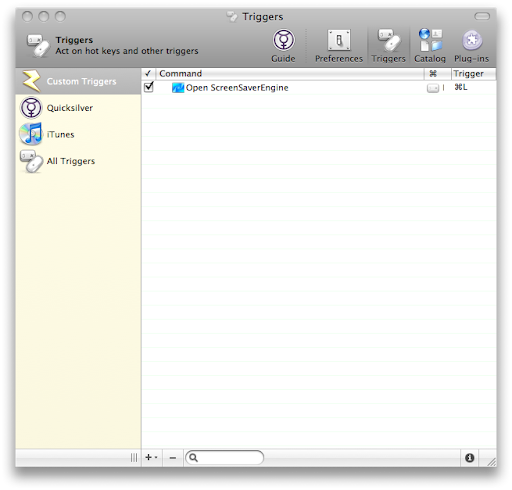
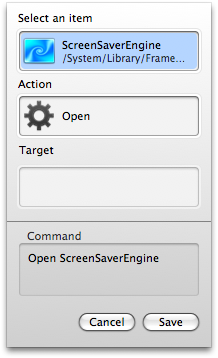
1. In QuickSilver, Create a trigger for /System/Library/Frameworks/ScreenSaver.framework/Resources/ScreenSaverEngine.app, in my case, I use command+L which is easier to remember.

Note: It's a bit weird to create trigger, especially the process to search. For peace of mind, just copy and paste the full path of the ScreenSaverEngine.app:)


Special Thanks to Brian who shared the tips with us in comment:)

2. execute this command in Terminal
/System/Library/CoreServices/"Menu Extras"/User.menu/Contents/Resources/CGSession -suspend


I don't like to use the hot corner to trigger a screen saver anyway. So to normal users use the Locker widget is probably the best approach I have found so far to lock a Mac.

It's weird to me that Apple don't assign a key combination to lock OS X.

Hope this helps.

Friday, November 14, 2008

Switch Oracle BPM (ALBPM) Studio Language

AquaLogic (Fuego) BPM is now part of Oracle BPM Suite and renamed to Oracle BPM.

Back in the 5.x era, the studio IDE is a Swing based app. As far as I know, from 5.7 BEA started to implement i18n for Studio. However, only several languages are available. It can be switched via menu.

From 6.0 whose code name is puma, a new Studio IDE is built on top of Eclipse IDE. In theory it is should support multiligual. However there is not apparent options in the UI to switch language.

A coworker of mine in China asked my that why his ALBPM 6.0 Studio was in Chinese Simplified. And he was not able to change it. After looking at the locale setting which was zh_CN. And he was not willing to change the system locale. So I told him to try switching using eclipse way:) It did work. I then digged further into the installation folder and found it is multilingual in fact.

Tip applicable for version:
ALBPM Studio 6.0.x
Oracle BPM Studio 10gR3 (10.3) which is ALBPM 6.5

How to use:
Windows OS
Edit the Studio shortcut and add the -nl option. It should look like this:
C:\Oracle\OracleBPMStudio\eclipse\eclipse.exe -nl de

*NIX
Assume that we install Studio in /opt folder.
/opt/OracleBPMStudio/eclipse/./eclipse -nl de
Note: In the 10gR3 Studio installatio folder, there is even no icon for the app but a Eclipse icon...

Check the installation folder and you will find the available languages:
C:\OracleBPMStudio\studio\eclipse\plugins
/opt/OracleBPMStudio/studio/eclipse/plugins

en
es
ja
ko
zh
zh_TW
de
fr
it
nl
pt

For more info on Eclipse:
http://help.eclipse.org/ganymede/index.jsp?topic=/org.eclipse.platform.doc.user/tasks/running_eclipse.htm

Wednesday, October 22, 2008

Install Ubuntu from USB Stick, Stop odering free Ubuntu CDs

Ubuntu 8.10, Intrepid Ibex is around the corner. I saw the news among my RSS subscriptions that we can now pre-order free Ubuntu 8.10 CDs now.

In the past few years, I have applied for 6.0.6 LTS CDs for x86, x86-64, powerpc, sparc(actually it's not possible for me to have a sparc powered machine at home, why I need this?), 7.04 CDs x86, x86-64 when I was working and living in Shanghai, China. In addition to the CDs, some stickers were in the package. They were posted from Europe and the postage was around several euros. The total cost would not be cheap.

To be open, I applied for Solaris 10(sparc + x86) free DVDs from Sun and got 2. I didn't feel guilty because after all Sun Microsystem is a commercial company. They have enough budget for things like this.

Later on, I found these CDs were useless to me, I hardly use them. Finally I gave all them away to my colleagues who were interested in trying Linux. I think it was a good result. It seemed that I used them to show that I am a GNU/Linux, Open Source supporter rather than install and spead. In fact I use the downloaded ISO image as well as bootable USB stick created via UNetbootin much more often.

I think it was something stupid. I requested for something useless to me, whilst it's a waste of Canonical's money as well as their limited resources.

Here I suggest that Ubuntu as well as other distros users try using USB installtion. It's much faster, cost effective, reusable and environmental friendly. I assume that now most machines support boot from USB devices.

Basically, we can create a bootable Linux distro USB stick by using UNetbootin (Universal NetBook Installer)/Ubuntu Live USB Creator/Live USB System Creator to create a bootable USB stick. I personally prefer to use UNetbootin. It's with a GUI and available on Linux and Windows. So easy to use.

In brief what UNetbootin can do for us:
1. Download the distro image automatically and install the distro to a USB stick, it's bootable. If we install distros like Ubuntu which supports LiveCD installation, of course you can now boot and install from the stick.
2. Already have the image? Just do it on the fly by choosing image and specify the path.
3. Advanced options, custom...

UNetBootin: http://unetbootin.sourceforge.net

More info: Install from USB Stick

Stop requesting useless CDs and save money for Canonical, leave the free CDs for people in real need, those who can't afford a USB stick and CD/DVD burner, those who don't have easy+fast internet access, those who...

That's what we can to do to spread Ubuntu - Linux for Human Beings. Also, stop burning useless CD/DVDs to protect our environment, our earth.

Saturday, October 18, 2008

Oracle BPM 10gR3 (ALBPM 6.5) GA

Oracle BPM 10gR3 which was BEA AquaLogic BPM, Fuego BPM is GA now.

From the new versioning, we can clearly see that it is 10.3. However, in fact it is 6.5.

After the acquisition, ALBPM has been renamed to Oracle BPM and put into the Oracle Fusion Middleware stack, along with Oracle BPEL Process Manager and Oracle BPA Suite.

Differences between BPM Suite offerings
Oracle
BPM
Human and System Centric BPM with SOA. Easy integration with WebCenter Interaction (AquaLogic Interaction, Plumtree Portal).
Business user friendly
Collaborative
Agile
BPMN & BPEL
SOA architecture
Apps integration, AIA


Oracle BPEL Process Manager
System Centric
SOA architecture
Apps integration, AIA
BPEL
High performance STP
Round-tripping with BPA

Oracle BPA Suite
Methodology Driven Process Modeling and Analysis.
Process Experts
Six Sigma, Lean
Methodology
Hierarchical Modeling
Documentation


Download: http://edelivery.oracle.com
or
http://www.oracle.com/technology/software/products/bpm/index.html

Fill in some necessary info and go to Oracle Fusion Middleware, choose your platform, you will finally find them in Oracle Application Server 10g Release 3 (10.1.3) Media Pack.

Studio
Enterprise Standalone
Enterprise for Weblogic Server
Enterprise For Websphere Application Server

I have no idea why the links on the page below haven't been upgraded yet. Maybe Oracle is going to decommission the BEA page.
http://www.oracle.com/technology/software/products/ias/bea_main.html

Oracle BPM 10gR3 docs
http://download.oracle.com/docs/cd/E13154_01/bpm/docs65/index.html
The docs are still not helpful enough, I hope that Oracle improves its newly acquired products. At least make them as good as Oracle Database docs.

Interoperability matrix:
http://www.oracle.com/technology/products/bpm/obpm_config_matrix.html

All BEA docs, including new versions of WebCenter Interaction suite (AquaLogic User Interaction).
http://www.oracle.com/technology/documentation/bea.html

Enjoy the new release. I believe that the next GA will be named 11g, if there is such thing.

Articles you may be interested in: Ten reasons why you should look at Oracle BPM Suite 10gR3

Sunday, August 31, 2008

My first Post on Blogspot

As a result of the takeover, my tech blog on dev2dev China community has been decommissioned without notification. I don't even know when and where it is done. Will all the invaluable tips and articles contributed by the tech folks be fully migrated to OTN? It is a big question mark.

Anyway, I have had backup for all the articles, I should thank Windows Live Writer (I use it in the only Windows I have). I recognize it as one of the best Windows Live projects (The others would be Windows Live Mail and Windows Live Folder Share, Live Mesh.).

As a knowledge worker nowadays, it sounds weird if u don't have a blog to share tips and experiences with folks. And also, some investigation statistics implies that blog and social networks seem to be some new form of resume and a better way to present your abilities. It's pretty much the new form of seeking new candidates and an alternative to traditional resume. Fair enough.

I am in the middle of moving and translating my previous articles into English. Later on, I will post articles mostly in English. But comments in Chinese warmly welcomed.

I think I am going to share more interesting stuff here.

About Me

Sydney, NSW, Australia
Keep Life Simple and Stupid:)

FriendFeed badge

Tags